Whatever you use today, it already knows things about you. ChatGPT has saved memories and your custom instructions. Claude Code and Codex have your rules files, your skills and the notes they keep between sessions. OpenClaw and Hermes have all of that plus scheduled jobs and a Telegram bot. Starting over with a new agent means teaching it all again.
Octomind Cloud can now take it as it is. Pick where you're coming from, and your memories, instructions and skills come over in one step. The same release lets routines start from any service that can call a URL, puts a spending cap on every run, gives octos an email address and a Discord bot, and adds seven image and video models. This post covers everything new in Octomind Cloud since our October 13 newsletter.
Bring your agent over in one step
Open Import in the panel (new accounts also see a "Coming from ChatGPT, Claude Code or another agent?" link on the first screen) and pick your source.
From ChatGPT
ChatGPT has no folder to export, so to export ChatGPT memory you copy and paste. In ChatGPT, open Settings → Personalization → Memory → Manage memories, select all and copy. Paste that into Saved memories. Your Custom instructions are on the same Personalization page; paste them into the second box. Each memory becomes its own memory in Octomind, and the instructions become the octo's instructions.
From Claude Code or Codex
Run one command on your own machine. It packs only the files the importer reads, so it stays small and leaves your transcripts and credentials where they are.
For Claude Code:
sh -c 'cd ~ && set --; for p in .claude/CLAUDE.md .claude/skills .claude/commands .claude/agents .claude/projects/*/memory; do [ -e "$p" ] && set -- "$@" "$p"; done; COPYFILE_DISABLE=1 tar czf ~/claude-export.tgz "$@"'For Codex:
sh -c 'cd ~ && set --; for p in .codex/AGENTS.md .codex/AGENTS.override.md .codex/prompts .codex/skills .codex/memories/MEMORY.md .codex/memories/memory_summary.md .agents/skills; do [ -e "$p" ] && set -- "$@" "$p"; done; COPYFILE_DISABLE=1 tar czf ~/codex-export.tgz --exclude=".codex/skills/.system" "$@"'The archive lands in your home folder. On a heavily used Mac it came to under 5 MB for Claude Code and about 250 KB for Codex.
From OpenClaw or Hermes
For OpenClaw:
openclaw automations list --all --json > ~/.openclaw/cron-export.json
tar czf openclaw-export.tgz -C ~ --exclude='*/sessions/*' --exclude='*/logs/*' --exclude='*.sqlite*' .openclaw
The first line matters. Since 2026.6.1, OpenClaw keeps scheduled jobs in its SQLite state database, and the automations export is how they leave it in a readable form.
For Hermes (memories, Hermes agent skills and cron jobs all come along):
tar czf hermes-export.tgz -C ~ --exclude='*/sessions/*' --exclude='*/logs/*' .hermesCheck it, then import
Upload the archive (up to 8 MB) or paste your ChatGPT text. Nothing changes yet: you get a preview of exactly what will come over, with everything importable already ticked.
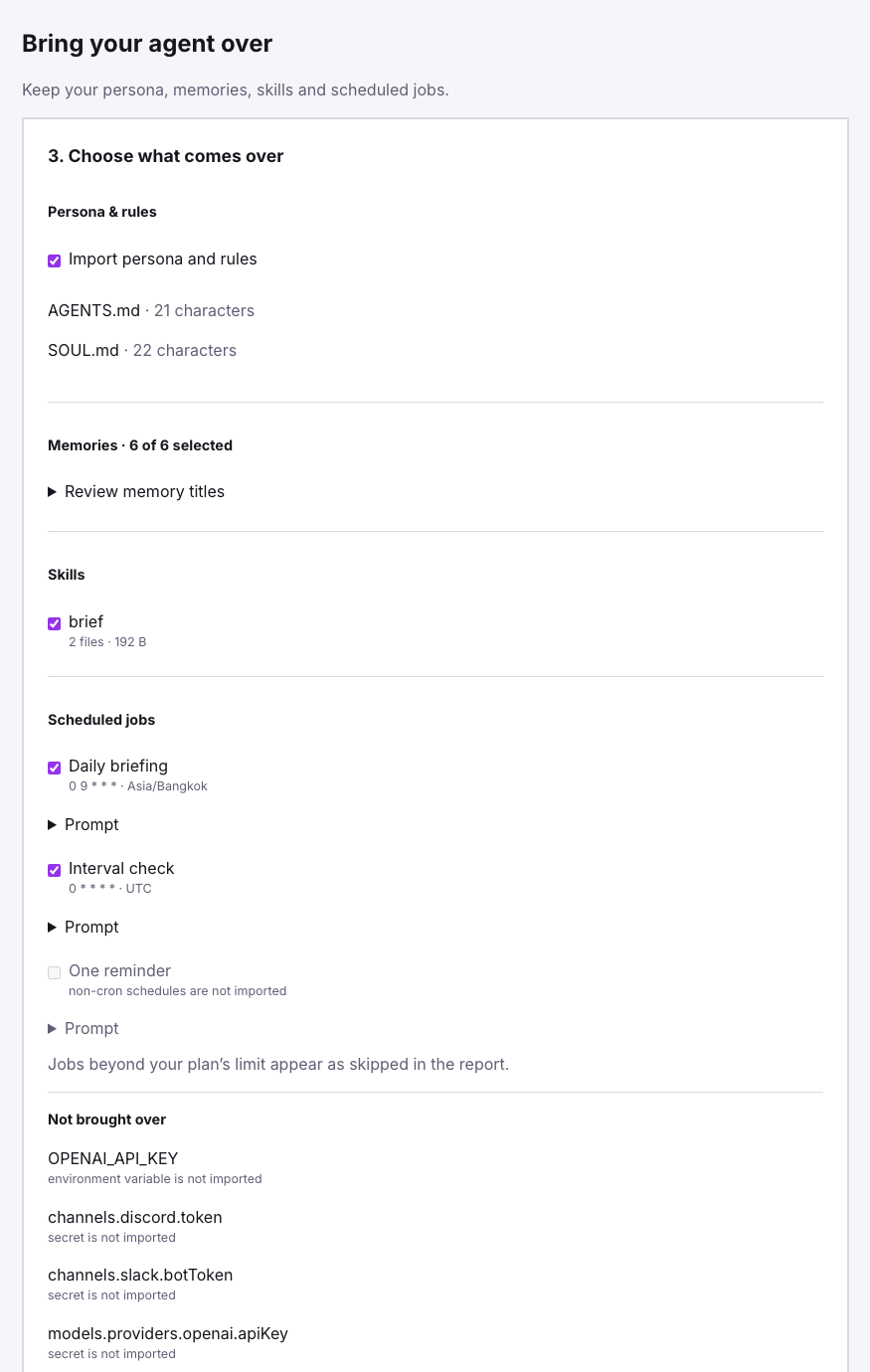
Here's where each piece lands:
| From your agent | In Octomind Cloud |
|---|---|
ChatGPT custom instructions, CLAUDE.md, AGENTS.md, SOUL.md | The octo's instructions |
ChatGPT saved memories, Claude Code and Codex memory notes, MEMORY.md, USER.md | Memories, one per entry |
Skills (SKILL.md and its files) | Your personal tap, so every octo can use them |
| Claude Code slash commands, Codex custom prompts | Skills |
| OpenClaw and Hermes cron jobs | Routines, with their timezone |
| Fixed intervals (every 15 min, hourly…) | Routines too, when cron can state the interval exactly |
| OpenClaw Telegram bot, or the Hermes one | A Connect this bot button; you press Start in Telegram once |
| API keys, credentials, transcripts | Never imported — listed so you know what stayed |
Untick what you'd rather leave behind, choose a machine and either a new octo or an existing one, and press Import. Each item reports as it lands. If something can't come over, the report says which item and why, and the rest still goes through. A skill whose name is already taken lands as -imported rather than overwriting yours.
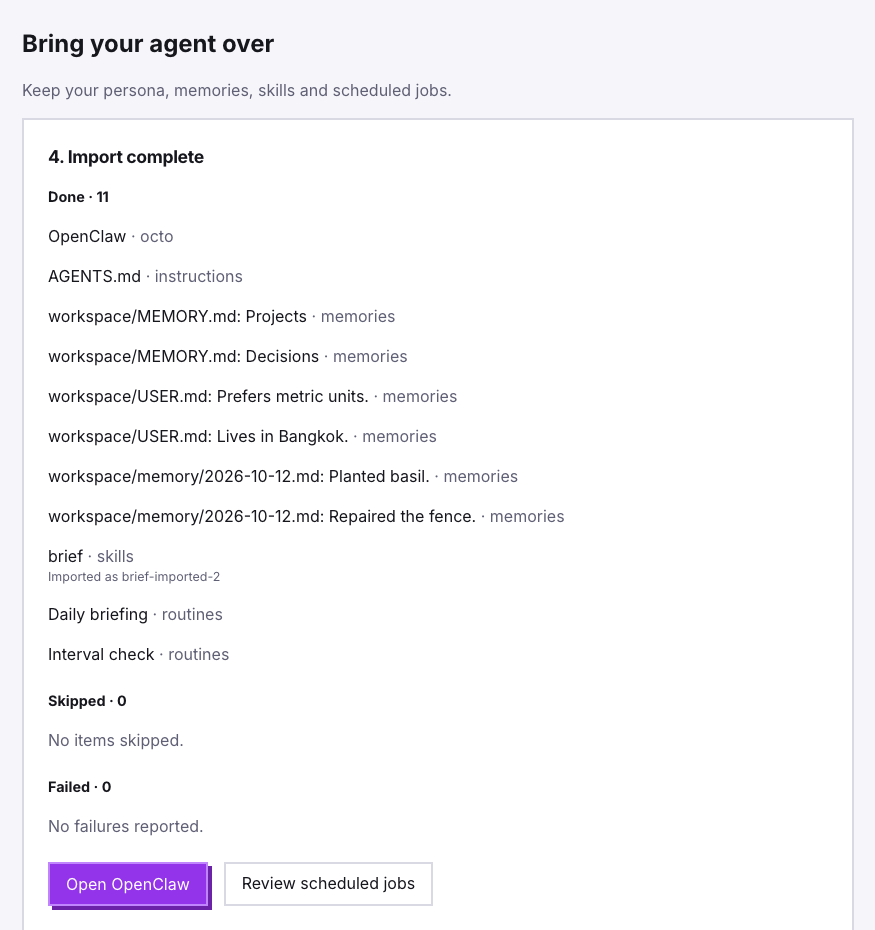
What you don't bring is the server. The octo runs on a Cloud machine that's sandboxed, kept up to date by us, and sleeps when idle unless you tell it to stay awake.
Start a routine from anything that can call a URL
Until now a routine ran on a schedule. Now it can also run when a URL is called. Pick that trigger and the routine gets a private address:
https://api.octomind.run/webhooks/routine/<routine-id>/<token>Point a deploy hook, a payment webhook, a form, Zapier or a monitoring alert at it. Whatever was posted becomes the event, and {{event}} in the prompt is where it goes:
A deploy event arrived: {{event}}.
If the status isn't "deployed", find out why from the logs and tell me in one paragraph.
To try it from a terminal:
curl -X POST "https://api.octomind.run/webhooks/routine/<routine-id>/<token>" \
  -H 'Content-Type: application/json' \
  -d '{"service":"billing-api","status":"rolled back","version":"2.4.1"}'
The call answers 202 straight away and the run starts within seconds.
For GitHub, paste the URL as a repository webhook with content type application/json. You can leave the secret empty, because the token in the URL is the secret. If you set one, use the last part of the URL, and GitHub's signature is then checked too.
A few details that matter once real services are calling it:
- Retries don't run twice. A delivery that carries
X-GitHub-Delivery,X-Delivery-IdorIdempotency-Keyruns once, however many times the sender retries. - Big events still fit. The prompt gets up to 16 KB of the event. The full body is saved on the machine as
.octomind/events/<id>.json, and the prompt says where. - Rate limits are per routine: 60 events an hour on Pro, 600 on Max and Team. Over the limit, the sender gets
429withRetry-After, the skip shows in the routine's history, and a retry after the window runs normally. - The routine page shows every delivery, has a Send test event button, and can rotate the URL if it ever leaks. The old one stops working at once.
A spending cap on every run
Every routine now has a Max per run that you can change. It starts at your plan's default ($0.50 on Pro, $2.00 on Max and Team). If a run costs more than that, it's marked over budget and you get a note saying so. One stuck routine can't quietly drain a month's allowance.
The other half is Only run when…: a shell command that runs on the machine before the agent does. If it exits with an error, the run ends there with no model call and nothing spent. That turns "check every 15 minutes" into "check every 15 minutes, think only when something changed":
# Only wake the agent when the status page reports a problem
curl -fsS https://status.example.com/api/status | grep -q '"degraded"'
Email your octo
In Settings → Connections → Email, choose which octo answers and press Create email address. The AI agent email address is made for you from the octo's name and a short code fixed to your account, like [email protected]. All your octos share the code, so they're easy to tell apart and easy to recognize as yours.
Forward the octo an email or CC it, and it answers in the same thread. Attachments arrive on its machine as files.
Only senders on the inbox's list get through. Your own address is on it from the start, and you can add people or whole domains (@yourcompany.com). Mail from anyone else is refused, and so is mail whose sender can't be verified (SPF or DKIM), so a forged "From" line doesn't get your octo to do anything.
Your octo on Discord
In Settings → Connections → Discord, press Add to Discord and add the Octomind bot to any server you're in. The panel shows a short LINK-… code. Send it to the bot in a DM and it confirms you're linked. From then on, a DM to the bot goes to your octo, a Discord AI agent with the same commands as Telegram (/new, /octos, /routines, /status). For now it answers DMs only.
New image and video models
Octos generate images and short videos when you ask. Seven more models are available, five of them served through Higgsfield's API:
| Model | Kind | Price | Good for |
|---|---|---|---|
| Kling 3.0 | video | $0.15 per second | Characters that talk, with dialogue and sound in the clip |
| Wan 3.0 | video | $0.10 per second | Quick drafts and product animation |
| Higgsfield Soul 2 | image | $0.03 per image | Photos of people with a fashion-shoot look |
| Nano Banana 2.1 | image | $0.12 per image | The newest Nano Banana, for everyday images and edits |
| FLUX 3 | image | $0.09 per image | The newest FLUX, for photorealism |
| Ideogram 4 | image | $0.06 per image | Posters and packaging with clean text |
| Recraft V4.1 | image | $0.07 per image | Illustrations that stay in your brand's palette |
Name a model in your request ("make a 9:16 clip with Kling 3.0") or leave it to the octo. A subscription draws these from its usage allowance; without one they bill your credits. Every model, with its price, is on the models page.
Smaller things
- Messages no longer get dropped while an octo is busy. If you wrote to an octo on Telegram while its helper was still working, the chat could stay locked and messages were dropped after 15 minutes. The lock now clears as soon as the octo's own turn ends. A message sent during a genuinely long turn waits for it, up to 30 minutes, instead of being dropped.
- Models keep answering when one provider has trouble. When a provider refuses a request outright (a billing problem, a revoked key, a model it no longer serves), we now move to the next provider for that model and rest the failing one, instead of returning the error to you.
- Machines run Octomind 0.58.0. Cloud machines pick it up the next time they start. The quick checks an octo makes on its own work (which memories apply, which skill to use, whether a result is really done) now run on one small, fast decision model, and you switch them on or off under one Decisions section in Config.
/infonow shows what those checks cost in the session. - A failed turn still counts its cost. The spend of a turn that ends in an error now lands on the session and on the routine's cap, instead of being missed.
Try it
If you're on OpenClaw or Hermes, the fastest way to judge this is to import your own agent and talk to it for a day. Start on Octomind Cloud, open Import, and run the export command. Your setup at home stays exactly as it was.
— DK