A comparison table has been going around. It puts Octomind next to Codex and says Codex has no workflow engine, swaps models only through prompts, recovers from errors only when the model notices them, and lets the model stream its way into whatever happens next.
Some of that is true, and some of it is a year out of date. It also leaves out Claude Code, which shipped its own scripted workflows, called dynamic workflows, this year. So I rebuilt the comparison from the vendors' current docs, and I ran the Octomind parts on my own machine. I build Octomind, so weigh my framing with that in mind; every competitor claim below links to the vendor's own page, checked October 22, 2026.
The short answer: all three can run a repeatable multi-step agent job. They differ in who decides what runs next. Claude Code workflows are JavaScript scripts that Claude writes for your task, which a runtime then executes. You can save a script and rerun it. Codex has no built-in workflow runner. In a Codex workflow, the model orchestrates its subagents, or you write the loop yourself around codex exec or the Codex SDK. Octomind runs a TOML file you write, with the model, timeout and retry count set per step and branches decided by regex over each step's output. Pick Claude Code when the shape of the job changes every time. Pick Codex when one agent plus a short script covers it. Pick a declarative file when the same pipeline has to run unattended, in CI, across model providers.
Who decides what runs next
The model, a script, or a file.
| Claude Code workflows | Codex | Octomind workflows | |
|---|---|---|---|
| Who writes the orchestration | Claude, from your prompt | The model (subagents) or you (shell, SDK) | You |
| What it's written in | JavaScript, saved to .claude/workflows/ | No workflow format; agents are TOML files in .codex/agents/ | TOML |
| Who picks the next step | The script | The model, or your code | The file's edges and conditions |
| Same steps on every run? | Only if you save and rerun the script | Only if your own code fixes them | Yes |
Anthropic's own docs draw the same line. In the Claude Code workflows guide (Anthropic, 2026), the "who decides what runs next" row reads "Claude, turn by turn" for subagents, "The lead agent, turn by turn" for agent teams, and "The script" for workflows.
How Claude Code workflows decide what runs next
The script decides, and Claude writes the script; a runtime executes it in the background. You ask in plain words ("use a workflow to…"), type the ultracode keyword, or turn on /effort ultracode so Claude plans a workflow for every substantive task. The script calls agent() to start a subagent, parallel() to run several at once, pipeline() to run one per list item, and phase() to group progress. Intermediate results stay in script variables, not in Claude's context (Anthropic, 2026).
The parts that matter if you want a repeatable job, all from that guide:
- Reuse. Press
sin/workflowsto save a run's script to.claude/workflows/(shared with the repo) or~/.claude/workflows/. It then runs as/<name>and reads input from a globalargs. - Replayable sequencing.
Date.now(),Math.random()and a barenew Date()throw inside the script, so a relaunched run repeats the sameagent()calls. Within a session, completed agents return their saved results on relaunch. A new run asks the models again. - Failure handling. An agent whose output stalls restarts from the same prompt, up to five times. An
agent()call with aschemareturns JSON and retries validation up to five attempts. Insideparallel()orpipeline(), a failed agent becomesnulland the run carries on. - Limits. 16 concurrent agents by default, 1,000 agents per run, and 4,096 items per
parallel()orpipeline()call. - Cost. A
Large workflowwarning appears past 25 agents or 1.5 million projected tokens, and the docs call it "advisory: it doesn't pause or limit the run". Anthropic's launch post (2026) suggests a budget in the prompt, such as "use 10k tokens". For a hard stop in headless runs,claude -p --max-budget-usdstops the run once estimated spend reaches the cap, though the CLI reference (Anthropic, 2026) warns that "Spend can pass the cap". - Models. Each workflow agent gets its model the way a subagent does. That means a per-call model, the agent definition's
modelfield (sonnet,opus,haiku,fableor a full ID), thenCLAUDE_CODE_SUBAGENT_MODEL, then the session model (subagents docs, Anthropic, 2026). The documented values are all Claude models. - Where it runs. All paid plans, Anthropic API, Bedrock, Google Cloud and Foundry. On Pro you turn it on in
/config. It also runs in Claude Code headless mode (claude -p) and the Agent SDK. There's no approval prompt there, so the launch goes through normal permission evaluation. Allow it with aWorkflow(orWorkflow(<name>)) rule, auto mode, bypass mode, aPreToolUsehook, or your host's permission callback.
The strength: Claude adapts the orchestration to the task. A 500-file migration and a three-angle research question get different scripts, and you never write either one. The cost: a script Claude writes today may differ from the one it writes tomorrow, unless you save it. And the docs say a single run "can use meaningfully more tokens" than doing the same work in conversation.
Does Codex have workflows?
Not as a runner. Codex has no workflow file or engine in its docs index (OpenAI, 2026). When those docs say "reusable workflows", they mean skills and plugins, which are instructions the model follows. It does have everything you need to build one, so the circulating table gets two of its four rows wrong.
Orchestration is the model's job, or yours. The Codex subagents guide (OpenAI, 2026) says Codex "handles orchestration across agents", and local releases spawn agents "after a direct request or applicable project or skill instruction". Anything more fixed than that, you script yourself:
codex execruns headless, in a read-only sandbox by default.--jsonstreams events as JSONL,--output-schemaasks for a final answer matching a JSON Schema,-owrites the last message to a file, andcodex exec resume --lastcontinues a run (non-interactive mode, OpenAI, 2026).- The Codex SDK (OpenAI, 2026) runs Codex threads from TypeScript or Python, "including jobs in CI". The TypeScript library can also resume a past thread by ID.
- The Codex GitHub Action (OpenAI, 2026) runs
codex execfrom a GitHub Actions workflow file.
Model choice is config, not prompting. That's the table's first wrong row. A custom agent file in .codex/agents/ sets its own model and model_reasoning_effort, and [agents] sets defaults for every spawned agent. One limit applies: custom agents "inherit the parent's permissions, provider, and MCP servers" and can't override them. So all subagents in a session use one provider. From a shell loop you can still pass a different -m or --profile to each codex exec call.
Error handling isn't only the model's. That's the second wrong row. Codex retries provider HTTP requests 4 times and interrupted streams 5 times by default (model_providers.<id>.request_max_retries and .stream_max_retries in the config reference, OpenAI, 2026). Codex hooks (OpenAI, 2026) run scripts or MCP tools at lifecycle events. A PreToolUse hook can deny or rewrite a tool call, and a Stop hook returning decision: "block" sends the turn back for more work. What Codex lacks is a step-level "retry this stage twice, kill it after 120 seconds". You write that into your script.
The strength: the least setup of the three. In our 25-PR benchmark, stock Codex was the cheapest and fastest setup by a wide margin. The cost: a Codex workflow that has to run the same way every night lives in a bash or TypeScript file you maintain, including its state, its bounds and its error handling.
Octomind workflows: a file you write
An Octomind workflow is a TOML file you write. octomind workflow file.toml reads stdin and runs each step as its own octomind run subprocess, passing each step's output to later steps as {{step_name}}. Nothing decides the next step except the file: steps run in order, in parallel blocks, in loop blocks with an exit_when condition, in conditional blocks, or along graph [[edges]] whose when tests a substring or a regex (workflows docs).
The other fields from the circulating table work as it says. model = "provider:model" overrides the model per step, across any configured provider. timeout kills a step after N seconds, and retries adds attempts when a step exits non-zero, times out, or returns no output. max_transitions bounds a graph, and max_cost stops the workflow when spend, checked after each successful step, passes a dollar figure.
What that looks like on a real run, on October 22, 2026, with Octomind 0.59.0. This step can't answer in one second, so it fails three times and the workflow exits 1:
[[steps]]
name    = "slow"
role    = "assistant"
prompt  = "Reply with the word OK.\n{{input}}"
timeout = 1
retries = 2╭ slow (attempt 1/3)
╰ ✗ slow timed out after 1s (attempt 1/3)
╭ slow (attempt 2/3)
╰ ✗ slow timed out after 1s (attempt 2/3)
╭ slow (attempt 3/3)
╰ ✗ slow timed out after 1s (attempt 3/3)
Error: step 'slow' failed after 3 attempts: timed out after 1s (attempt 3/3)That's the stderr, with the header and blank lines trimmed. The model never got a say in that failure. The same goes for routing. In this second run, a triage step labels a bug report, and a regex picks the branch:
[[steps]]
name        = "route"
conditional = true
condition   = { output = "triage", matches = "(?m)^LABEL: SECURITY$" }
on_match    = ["security-plan"]
on_no_match = ["quick-fix"]╭ triage (attempt 1/2)
╰ ✓ triage 19.0s · $0.0107 · 6492 tok · ⚒0
LABEL: SECURITY
· route: condition true → [security-plan]
╭ security-plan
╰ ✓ security-plan 24.3s · $0.0049 · 6649 tok · ⚒0
total · 43.4s · $0.0157 · 13141 tok · ⚒0That's trimmed stderr again, minus the header and the three bullets security-plan wrote. That run used zai:glm-5.3, and the quick-fix branch never started. The model still writes LABEL: SECURITY. The file decides what that label triggers.
The strength: the pipeline is reviewable before it runs. --dry-run prints the full plan without spending a token, and every model, bound and route is in one diffable file.
The cost: you write and maintain the file, and it doesn't adapt to the task the way a script Claude writes for that task does. Input comes from stdin only, with no --var injection.
One review loop, three ways
Here's the job: implement a change, run two reviews in parallel, ask for a verdict, and fix and re-review until the verdict passes, within a fixed bound. The Octomind file was dry-run on October 22, 2026. The other two follow the vendors' documented shapes and passed node --check and bash -n, but I didn't run them against a model.
Octomind (review-loop.toml, trimmed; dry-run verified):
name            = "review-loop"
entry           = "implement"
max_transitions = 12      # hard bound on step executions
max_cost        = 5.00    # stop check in USD, not a billing cap

[[steps]]
name    = "implement"
role    = "developer:general"
model   = "zai:glm-5.3"
session = "continue"
timeout = 900
retries = 1
prompt  = "Implement this request and run the tests:\n\n{{input}}"

[[steps]]
name        = "reviews"
parallel    = true
min_success = 2

  [[steps.run]]
  name   = "correctness"
  role   = "developer:brief"
  model  = "openai:gpt-6.1-sol"
  prompt = "Review the worktree for correctness against:\n\n{{input}}"

  [[steps.run]]
  name   = "maintainability"
  role   = "developer:brief"
  model  = "anthropic:claude-sonnet-5-5"
  prompt = "Review the worktree for needless complexity. Request:\n\n{{input}}"

[[steps]]
name    = "verdict"
role    = "developer:brief"
timeout = 120
retries = 2
prompt  = "Reply PASS on its own line only if neither review has an actionable issue. Otherwise list the fixes:\n\n{{reviews}}"

# "fix" mirrors "implement" with prompt "Apply every valid fix, then rerun the tests:\n\n{{verdict}}"

[[edges]]
from = "verdict"
to   = "$end"
when = { matches = "(?m)^PASS\\s*$" }

[[edges]]
from = "verdict"
to   = "fix"
# plus implement → reviews, reviews → verdict, fix → reviews
octomind workflow review-loop.toml --dry-run prints the resolved routes:
routes:
  implement -> reviews  default
  reviews -> verdict  default
  verdict -> $end  when output=None contains=None matches=Some("(?m)^PASS\\s*$")
  verdict -> fix  default
  fix -> reviews  default
Claude Code (.claude/workflows/review-loop.js; docs-only, syntax-checked):
export const meta = {
	name: 'review-loop',
	description: 'Implement, review twice in parallel, fix until the verdict passes'
};

const VERDICT = {
	type: 'object',
	required: ['pass', 'fixes'],
	properties: { pass: { type: 'boolean' }, fixes: { type: 'string' } }
};

phase('Implement');
await agent(`Implement this and run the tests: ${args.task}`);

for (let round = 1; round <= 5; round++) {
	phase(`Review ${round}`);
	const reviews = await parallel([
		() => agent(`Review the uncommitted changes for correctness against: ${args.task}`),
		() => agent(`Review the uncommitted changes for needless complexity: ${args.task}`)
	]);
	const verdict = await agent(
		`Set pass to true only if neither review has an actionable issue.\n\n${reviews.join('\n\n')}`,
		{ schema: VERDICT }
	);
	if (verdict.pass) return `PASS in round ${round}`;
	await agent(`Apply these fixes, then rerun the tests: ${verdict.fixes}`);
}
return 'no PASS after 5 rounds';
In practice you'd ask Claude for this loop in a sentence and save what it writes. The shape above is what the docs say a saved script looks like.
Codex (review-loop.sh; docs-only, bash -n clean, flags checked against codex exec --help for codex-cli 0.163.0):
#!/usr/bin/env bash
# implement → two parallel reviews → verdict → fix, at most 5 rounds
set -euo pipefail
task="$1"

codex exec --sandbox workspace-write -m gpt-6.1-sol "Implement this and run the tests: $task"

for round in 1 2 3 4 5; do
  codex exec -m gpt-6-luna -o correctness.md \
    "Review the uncommitted changes for correctness against: $task" &
  codex exec -m gpt-6-luna -o maintainability.md \
    "Review the uncommitted changes for needless complexity: $task" &
  wait

  codex exec --output-schema verdict.schema.json -o verdict.json \
    "Set pass to true only if neither review has an actionable issue. Reviews: $(cat correctness.md maintainability.md)"

  if jq -e '.pass' verdict.json > /dev/null; then
    echo "PASS in round $round"; exit 0
  fi
  codex exec --sandbox workspace-write -m gpt-6.1-sol \
    "Apply these fixes, then rerun the tests: $(jq -r '.fixes' verdict.json)"
done

echo "no PASS after 5 rounds" >&2
exit 1
verdict.schema.json is a two-field object (pass boolean, fixes string) with additionalProperties: false.
What actually enforces each property:
| Claude Code script | Codex shell loop | Octomind file | |
|---|---|---|---|
| Loop bound | Your for loop; 1,000 agents per run | Your for loop | max_transitions = 12 |
| Pass/fail check | JSON schema, validated up to 5 attempts | --output-schema, then jq | Regex on the verdict text |
| Step timeout | Stall window (stallMs), then a restart, up to 5 times | Not built in (wrap with timeout) | timeout = 120 |
| Step retry | Stall restarts and schema re-validation, up to 5 each | Not built in | retries = 2 |
| Model per step | Claude models | Per call with -m; other providers through a model_providers profile | Any provider:model |
| Spend stop | Advisory warning; --max-budget-usd in -p | No dollar stop; a token-budget feature is in development and off by default | max_cost, checked between steps |
The full comparison
Here's every row that came up, checked October 22, 2026, against Claude Code 2.1.308, codex-cli 0.163.0 and Octomind 0.59.0.
| Claude Code | Codex | Octomind | |
|---|---|---|---|
| Workflow feature | Dynamic workflows (JavaScript) | None; subagents plus your scripts | Workflows (TOML) |
| Saved where | .claude/workflows/, ~/.claude/workflows/, plugins | n/a; agents in .codex/agents/ | Any path, or a tap |
| Branching | JavaScript if on agent output or schema fields | Model's choice, or your script | contains / matches regex on step output |
| Parallel fan-out | parallel(), pipeline(); 16 concurrent by default | Subagents; max_concurrent_threads_per_session | parallel = true, max_parallel, min_success, regex match fan-out |
| Structured output | schema on agent(); --json-schema in -p | --output-schema | --schema on octomind run |
| Hooks and guards | PreToolUse can block; Stop exit 2 continues | PreToolUse deny/rewrite; Stop block continues | [[guard]] blocks; [[hook]] and [[validator]] nudge |
| Headless | claude -p, Agent SDK | codex exec, SDK, GitHub Action | octomind workflow with --format jsonl |
| Plan to use it | Any paid Claude plan, or API, Bedrock, Google Cloud or Foundry access | Any ChatGPT plan from Free up, or an API key at API rates | Free and open source; bring a provider key or sign in with ChatGPT |
| License | Proprietary ("All rights reserved") | Apache-2.0 | Apache-2.0 |
Sources for the competitor rows: Claude Code workflows, hooks reference, CLI reference, the Claude Code license, Codex subagents, Codex hooks, Codex non-interactive mode, and the Codex license. For Octomind's guardrail split, see the guardrails docs.
What the benchmarks say, and what they don't
We haven't benchmarked these three workflow engines against each other. What we have is agent-level data.
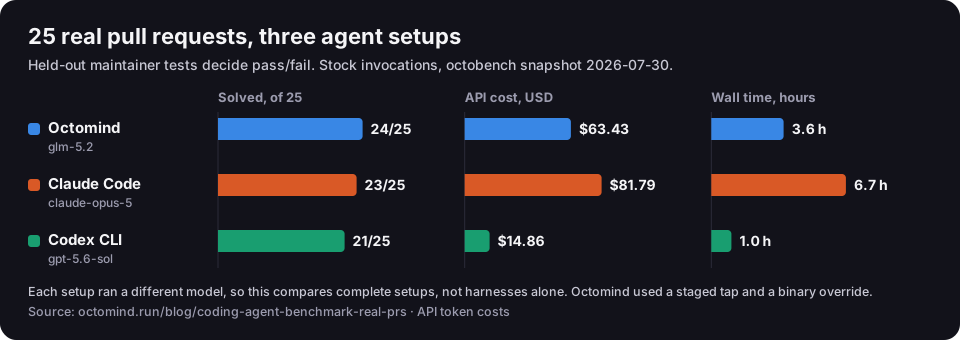
In our benchmark on 25 real pull requests (July 30, 2026 snapshot, stock single-agent invocations), Octomind with glm-5.2 solved 24 for $63.43 in 3.6 hours. Claude Code with claude-opus-5 solved 23 for $81.79 in 6.7 hours, and Codex with gpt-5.6-sol solved 21 for $14.86 in 1.0 hour. Each setup ran a different model, and Octomind ran with a staged tap and a binary override, so this compares complete setups, not harnesses. The Codex vs Claude Code breakdown walks through the per-case numbers.
The cleaner harness test held the model fixed. With gpt-6.1-sol on six tasks, Octomind used 0.69x the tokens and 0.80x the cost of Codex CLI's five-round median. It was also about 9% slower on normalized time, from one run per task (same-model tool-calling write-up). Neither result says anything about workflows. Both show that the harness around the model changes the bill.
Where each approach breaks
- The regex only checks the text. A file-defined route still depends on the model writing
PASSon its own line. Anchor the pattern ((?m)^PASS\s*$, notcontains = "PASS", which also matches "NOT PASSED"), and put the exact reply format in the verdict prompt. max_costisn't a billing cap. Octomind checks it after successful steps and parallel blocks, and it doesn't interrupt work in flight. Set it below your real ceiling, and set provider-side limits too. Claude Code's--max-budget-usdcarries the same caveat in its own docs.- A Claude-written script changes between runs. Save the run you trust, then invoke
/<name>. Don't re-prompt the same task every night. Also know that a failure mid-fan-out reruns later agents on relaunch: if B fails among A, B, C and D, then B, C and D run again. - A Claude Code workflow in CI that never starts. In
claude -pthere's no approval prompt, and deny rules anddontAskmode apply to the launch like any tool call. Add aWorkflowallow rule, or approve it from aPreToolUsehook. - A shell loop has no state. If the Codex script dies in round 3, rerunning starts again from implementation. Write a round marker to disk, or move the loop into the Codex TypeScript SDK, which resumes a thread by ID.
- One provider per Codex session. Subagents can't change
model_provider. To mix providers, give eachcodex execcall its own--profile.
Which one to choose
Choose Claude Code workflows if
- The job's shape changes every time. Audits, migrations and research questions differ run to run, and Claude can write a fresh script for each.
- You already pay for Claude. Workflows come with every paid plan, and runs count against your usage limits.
- You want cross-checking built in. The bundled
/deep-researchworkflow cross-checks claims across sources and filters the ones that fail.
Choose Codex if
- One agent, or a short script, does the job. In our benchmark, stock Codex was by far the cheapest and fastest agent.
- Your pipeline is a GitHub Actions workflow.
openai/codex-action@v1runscodex execwith the permissions you set. - You'd rather write orchestration in a real language. The SDK runs threads from TypeScript or Python, and the TypeScript one resumes them by ID.
Choose a declarative file (Octomind) if
- The same pipeline must run the same way unattended. Nightly review, release notes, triage: anything a reviewer should be able to diff.
- Steps need different providers. One file can pair a cheap model for triage with a stronger one for review.
- You want bounds before you spend.
--dry-run,max_transitions, per-steptimeoutandretries, andmax_cost, all in the file.
FAQ
Are Claude Code workflows deterministic?
The sequencing is, and the agents aren't. Claude Code makes Date.now() and Math.random() throw inside the script, so a relaunch replays the same agent() calls in the same order. Each agent's answer still comes from a model. A script Claude writes fresh for a new prompt can also differ from yesterday's, so save the one you trust.
Can Claude Code workflows run in CI?
Yes. For Claude Code automation in CI, workflows run in claude -p (headless mode) and the Agent SDK. There's no approval prompt in either, so allow the Workflow tool through a permission rule, auto mode, bypass mode, a PreToolUse hook, or your host's permission callback. One catch: the ultracode keyword doesn't trigger a workflow from a -p prompt.
Does Codex have workflows?
Not as a built-in feature. Codex has subagents, custom agent files with per-agent models, hooks, codex exec, the Codex SDK and a GitHub Action. A fixed multi-step workflow means writing the loop yourself, in shell, TypeScript or Python.
What is ultracode in Claude Code?
A Claude Code setting that has Claude plan a workflow for every substantive task in the session. Turn it on with /effort ultracode, or use the keyword in one prompt. Anthropic notes that each request then "uses more tokens and takes longer" and reaches plan limits sooner.
Can one workflow use models from different providers?
In Octomind, yes: each step's model is a provider:model string. In Claude Code, workflow agents choose among Claude models. In Codex, subagents share the parent session's provider, but separate codex exec calls can each use a different profile.
The table that started this
The circulating table asked the right question, even where its answers had aged. The difference between these tools isn't the model. It's where the plan lives. Put it in the model when every task is new. Put it in a script when you want Claude to write the plan and you'll keep the good ones. Put it in a file when the plan is the asset, and you want to read it, diff it and bound it before anything runs.