
Octomind 0.29.0 was about the model's surface: a face for the terminal, a brain that picks its own context, and tools that ship in your repo. 0.30.0 is about everything that wraps around the model — the orchestration above the session, the policy beside the tools, a window into everything the session did, and the memory it carries between sessions.
Four things changed that you'll feel in the first hour:
- Workflows moved out of your config and into a portable file you run from the command line.
octomind workflow file.tomlchains independentoctomind runcalls — sequential, parallel, looping, branching. - Guardrails put deterministic policy where tool calls actually happen, in a project-local
.agents/guardrails.toml. Block a dangerous call before it runs; nudge the model after it forgets to test. - Session observability turns every run into something you can watch in a browser — open the live session locally and privately with
/analyze, or publish a permanent shareable link with/share. - Global lessons let the agent carry your user-wide preferences across every project, on top of the project-scoped corrections it already learns.
This is a big release. Below is the full picture: the headline features in depth, the rest in brief, and exactly what to do when you upgrade.
Workflows: Orchestration Above the Session
The single biggest change in 0.30.0: multi-step orchestration is no longer a session feature. It's a standalone CLI command that runs a portable file.
echo "build a JSON-to-CSV CLI in Rust" | octomind workflow dev.tomlThat's it. octomind workflow <file.toml> is an external orchestrator. Each step spawns an independent octomind run subprocess; the output of one step flows into the next by name. There's nothing to wire into default.toml, nothing bound to a role, nothing that only fires on the first message. The workflow file is the whole unit of reuse — commit it, share it, run it anywhere Octomind is installed.
Four step types
A workflow is a TOML document with a list of steps. Each step is one of four kinds:
- Sequential (the default) — run one
octomind run, pass the output forward. - Parallel (
parallel = true) — run several sub-steps concurrently; the next step waits for all of them. - Loop (
loop = true) — run sub-steps in sequence, repeat until anexit_whencondition matches ormax_iterationsis hit. This is the generator/evaluator pattern: a developer step writes code, a tester step checks it, and the loop runs again until the tester says it's clean. - Conditional (
conditional = true) — branch on a pattern match in a prior step's output.
This generator/tester loop builds, verifies, and scores:
name = "gan"

[[steps]]
name   = "spec"
role   = "developer:general"
prompt = "User request:\n{{input}}\n\nWrite an implementation spec."

[[steps]]
name           = "refine"
loop           = true
max_iterations = 3
exit_when      = { output = "tester", contains = "NO ISSUES" }

  [[steps.run]]
  name    = "developer"
  role    = "developer:general"
  session = "continue"
  prompt  = "Implement:\n{{spec}}"

  [[steps.run]]
  name    = "tester"
  role    = "developer:brief"
  session = "continue"
  prompt  = "Verify against spec:\n{{spec}}\n\nImplementation:\n{{developer}}"

[[steps]]
name   = "evaluator"
role   = "developer:general"
prompt = "Score this 1-10:\nSpec: {{spec}}\nCode: {{developer}}\n\nSCORE: <n>/10"
{{input}} is the stdin you piped in; {{spec}}, {{developer}}, and {{tester}} are the captured outputs of earlier steps. Set session = "continue" on a loop's sub-steps and the session is resumed between iterations (compressing prior context first), so the generator and tester refine against accumulated state instead of re-reading the whole spec every round.
Things that make it usable in practice
- Per-step model overrides. Put a cheap model on the classifier step and a frontier model on the real work —
model = "anthropic:claude-sonnet-4-6"on any step. - Retries and timeouts.
retries = 2andtimeout = 120bound flaky steps and external hangs. --dry-run.octomind workflow file.toml --dry-runvalidates the file and prints the execution plan without spawning anything or spending a token. Pre-flight validation catches unresolved{{vars}}, duplicate step names, and bad regex before any model runs.- Live, legible progress. Every step, its cost, its token count, its tool-call count, and the running total stream to stderr as boxed, named blocks — so you always know which step you're in and what it's costing.
One important contract: a real run writes nothing to stdout. All the human-facing progress goes to stderr; stdout is used only by --dry-run to print the plan. If you need a step's text downstream, have the final step write it to a file itself.
The old system is gone
If you used the previous in-session orchestration — the [[workflows]] config block, the /workflow command, role-bound workflows, role-bound [[pipelines]], or enable_layers — all of it is removed in 0.30.0. Not deprecated; deleted. The new file-based command replaces it and does the same job at the right altitude.
We wrote the full story — why the old design was trapped inside the session, and exactly how the new one works — in Hi, Workflow. We Deleted the Old One. Read that for the deep dive on the new workflow system.
Guardrails: Policy Where the Actions Happen
LLMs follow instructions probabilistically. Tool calls are deterministic. The gap between those two facts is where agents go off the rails — the model says "Done" without running the tests, or it's one token away from git push --force to main.
You can't close that gap by writing more rules into a system prompt. Instructions are soft. Tool calls are hard. So in 0.30.0, Octomind reads a project-local policy file, .agents/guardrails.toml, and enforces it at the points where actions actually happen. Four section types cover four phases of the session lifecycle:
| Section | Phase | What it does | Can it stop the agent? |
|---|---|---|---|
[[pipe]] | Pre-model | Transform or validate user input before the model sees it | Yes — non-zero exit is a hard stop; stdout replaces the message |
[[guard]] | Pre-call | Block a tool from running | Yes — the call never executes; the model gets a synthetic error |
[[hook]] | Post-result | Run a script against a tool result | No — it can only push a message to the inbox |
[[validator]] | End-of-turn | Run a script after the assistant's final message | No — it can only push a message to the inbox |
The split matters: [[pipe]] and [[guard]] can block; [[hook]] and [[validator]] can only nudge (they push a note the model reads on its next turn — they can't undo what already happened).
A guard that stops the call you don't want to argue with:
[[guard]]
match   = "shell(command=^rm\\s+-rf?\\s+/)"
message = "Refusing rm -rf on root paths."

[[guard]]
match   = "shell(command=git push.*(--force|-f)\\b)"
message = "Force push blocked. Use --force-with-lease and ask first."
A validator that nudges the model when it claims it's done but never ran the tests:
[[validator]]
name   = "test-before-done"
match  = "(?i)\\b(done|finished|completed)\\b"
when   = ["+filesystem-write", "-shell(command=cargo test)"]
script = ".agents/validators/remind-tests.sh"
Matching is capability-based, not tied to a specific MCP server name, and when conditions read a session-wide history of successful tool calls — so you can write rules like "block ls until the read capability has been used" or "remind me to test if I edited files but never ran cargo test." The file is project-local: commit it with your repo and every contributor's session inherits the same policy.
We wrote a full piece on the design and the three failure modes LLMs can't self-correct: Guardrails for AI Agents: Why Prompts Aren't Enough. Start there for the complete matching DSL and the pipe/guard/hook/validator contracts.
Session Observability: Analyze It Locally, or Share It
Every Octomind session is already a complete forensic trace on disk — every user and assistant turn, every tool call with its arguments and results, every cost update, every skill activation, every compression marker, in order. Until now that trace was a JSONL file you'd squint at with jq. 0.30.0 gives it a real web viewer for agent tracing, and two ways in that sit on opposite ends of a privacy spectrum: analyze it locally and securely, or publish it.
/analyze — inspect the live session locally, nothing uploaded
Type /analyze mid-session and Octomind opens the current, in-flight session in the browser viewer without sending a single byte to a server. It stands up a tiny bridge bound to loopback (127.0.0.1) on a random port, hands you a URL, and the browser fetches the JSONL straight from your machine.
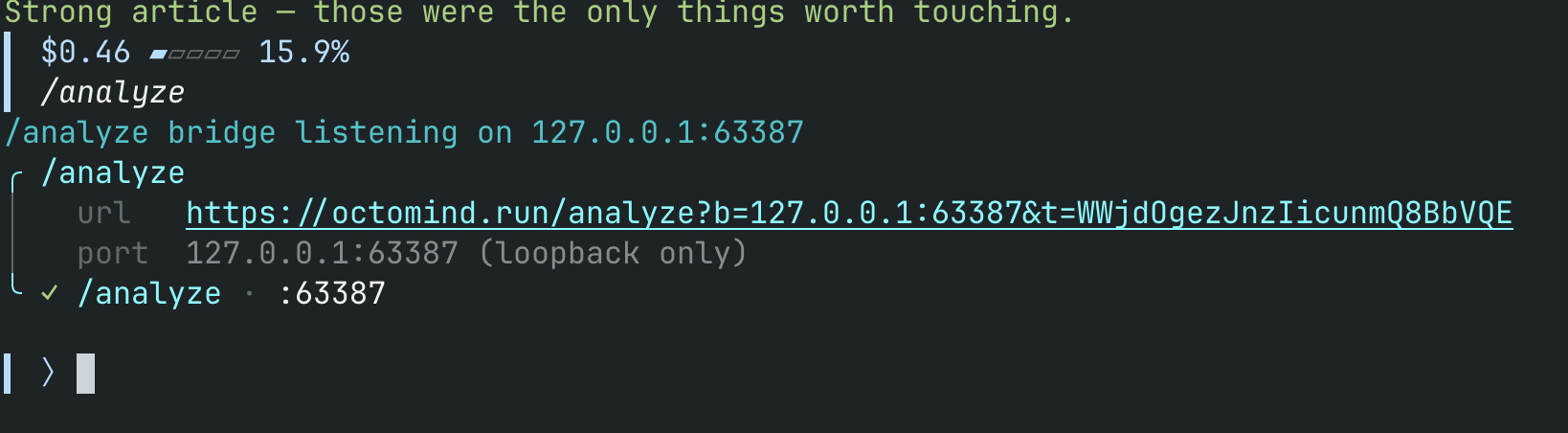
It's locked down by construction:
- Loopback only. The bridge listens on
127.0.0.1— unreachable from any other machine. - Single-use token. Every request must carry a 24-character token in a header; a fresh port and token are minted on each
/analyze. - Ephemeral. Re-invoking
/analyzeaborts the previous bridge, and the whole thing shuts down with theoctomindprocess. No persistent state, no upload, nothing to clean up.
This is the command you'll reach for constantly: a private, in-flight window into the run you're watching right now — to see what a tool returned, where cost spiked, or why the agent took the turn it did.
/share — publish a permanent link
When you want the session to leave your machine — to hand a teammate a bug repro, to show your work, to attach a full trace to a ticket — /share uploads the log and prints a permanent public URL:
url    https://octomind.run/r/<8-char id>
id     <8-char id>
Anyone with the link sees the whole session rendered exactly as it ran. /share is a publish action: the log is uploaded and the link is public, so treat it like posting a gist — share deliberately, and don't /share a session that contains secrets you wouldn't paste publicly. For anything you want to keep private, use /analyze instead.
What the Viewer Shows
Both commands open the same viewer — full agent observability, not a flat log dump:
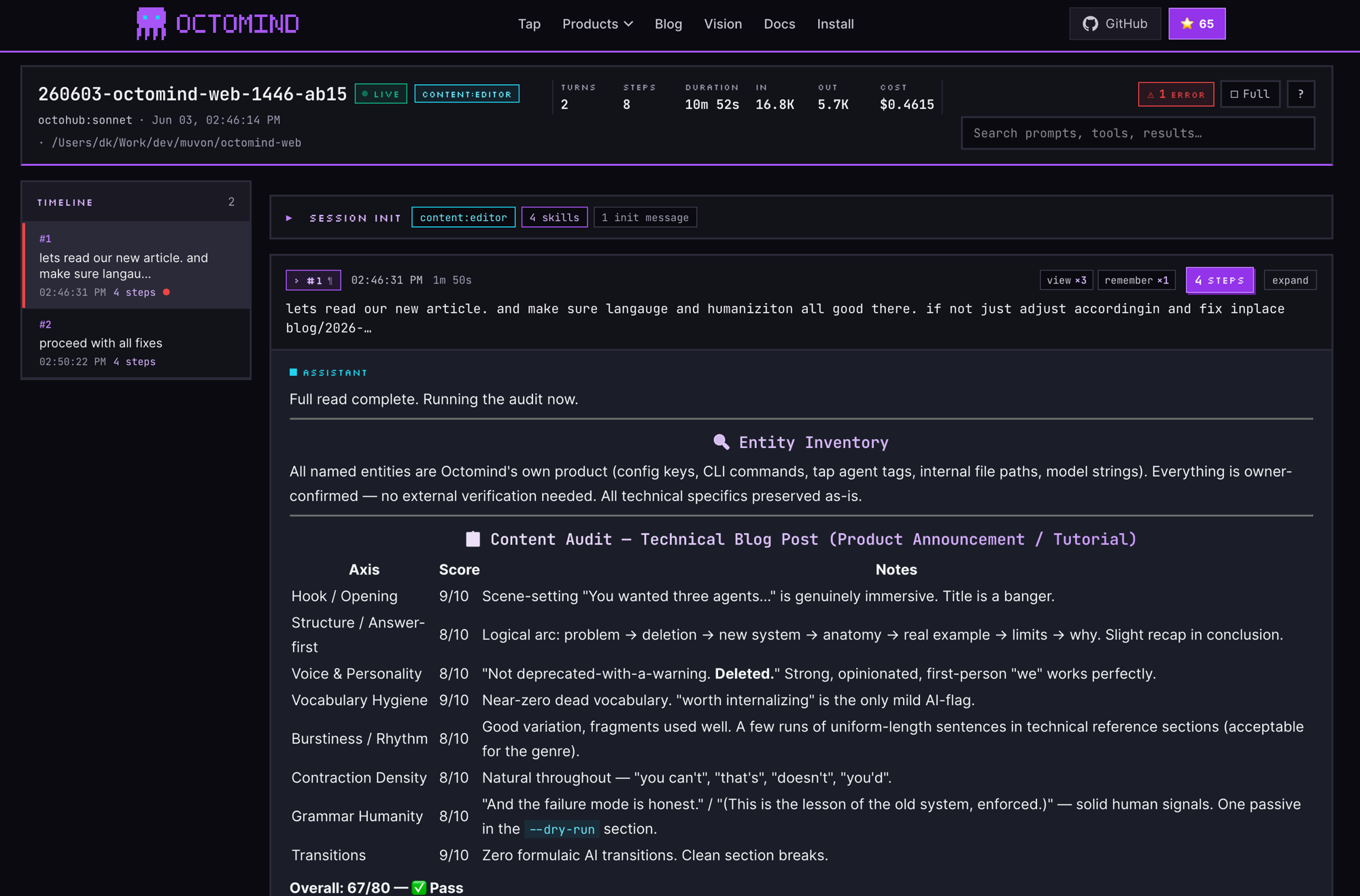
- A header with the session id, the role and model it ran under, a live/▪ status, and the totals that matter: turns, steps, duration, input/output tokens, and total cost in real dollars.
- A turn timeline down the side — click any turn to jump to it.
- Each turn expands into the exact prompt, every tool call with its arguments and results, the skills that activated, per-step costs, and any errors (flagged in red).
- Full-text search across prompts, tools, and results, so a two-hour session becomes something you can navigate.
That's the point of AI agent observability: a session stops being something only you saw scroll past in a terminal and becomes something you can audit, debug, and hand to someone else — why a run cost what it did, which tool failed, where context got compressed, and what the agent was actually told.
Cross-Session Learning, Now With Global Lessons
Octomind already learns from your corrections: after you finish a unit of work (/done) or during automatic compaction, a cheap model extracts a small number of lessons from the rules and corrections you gave it, and re-injects the relevant ones into future sessions so it stops repeating the same mistakes. 0.30.0 makes those lessons reach further with a new global tier and a two-tier recall.
Every lesson now carries a scope:
- Scoped (the default) — tied to one project and role, retrieved by relevance to what you're working on right now via hybrid keyword + embedding search. "In this repo, every API endpoint requires bearer auth" stays in this repo.
- Global — a durable, user-wide preference that applies in every project and every role. "Always open a single PR" follows you everywhere. Global lessons are ranked by importance and injected once per session, no relevance gating.
The extractor is deliberately conservative about what it keeps:
- A decision gate runs first: the model emits
LEARNorNONE, and onNONEnothing is stored. - Every lesson must carry verbatim evidence quoting you — no evidence, no lesson.
- At most three lessons per extraction. One strong lesson beats three weak ones.
- Only your corrections and stated rules qualify. Things the AI figured out on its own, one-off debugging steps, and anything derivable by reading the codebase are excluded.
Lessons are plain markdown files you can read and edit, and a /learning command lets you browse, filter, and prune them:
/learning                 # list lessons for this role + project
/learning list *auth*     # filter by pattern
/learning delete 3        # remove one
/learning clear           # wipe the current scope
Learning stays separate from memory: memory is broad context (architecture, code patterns); learning is the narrow, structured, confidence-scored set of corrections you actually gave the agent. It's on by default in the shipped config.
Compression: Hardened, Not Reinvented
Octomind's context-compression engine — the cache-aware logic that only compresses when the math says it saves money, with escalating pressure levels, a hard token ceiling, and critical-knowledge retention — has been in place since earlier releases. 0.30.0 doesn't reinvent it; it makes it more reliable and cheaper to run:
- Structured decisions. The compress-or-skip decision and the summary now come back as structured JSON (with an XML fallback for providers that don't do structured output) instead of free-text the runtime had to parse — far fewer malformed or header-only summaries, and your in-progress intent is carried forward in a synthetic continuation wrapper so the model never "starts fresh" mid-task.
- A cheaper default. The default compression decision model drops from
anthropic:claude-haiku-4-5to the faster, cheaperopenai:gpt-5-mini. - Steadier under pressure. Fixes stop the compression ratio from wrapping around during sustained pressure, and a whole class of invalid or orphaned tool-call sequences during compression is gone.
If you want the full mechanics — pressure levels, the net-benefit cost model, the hard ceiling, and forced vs automatic /done compression — the compression guide covers it end to end.
Everything Else in 0.30.0
The headlines above are the ones you'll feel. The rest, briefly:
- Compressed, persistent session logs. Session logs are now zstd-compressed on disk, and a persistent command log records what ran — smaller footprint, full replayability (and the raw material the session viewer reads).
- Idle-based scheduling.
/schedulecan now fire a queued message when the session goes idle, not just on a clock — so background work lands at a natural break instead of interrupting you mid-thought. - A config toggle for capability auto-activation. If you want full manual control over which skills load, you can now turn intent-based auto-activation off in config.
- Sessions remember their role. A session now persists the role it ran under (replacing the old provider field), which is what lets
/share,/analyze, and continue-mode workflows resolve cleanly. - A reliability sweep. A long list of panics, deadlocks, and edge cases got fixed — malformed tool calls no longer panic, and stdin MCP servers restart if they die mid-call. Less drama, more uptime.
For the complete, itemized list, see the changelog.
Upgrade Notes
Regenerate your config the easy way. Running octomind init gives you the new defaults — the [learning] table and the new openai:gpt-5-mini compression decision model — automatically.
The old workflow system is removed. If your config still has a [[workflows]] block, a [[pipelines]] block, workflow = "…" on a role, or enable_layers = true, those are gone in 0.30.0. Move that orchestration into a standalone octomind workflow file.toml — see the workflows guide for the migration shape. This is the one breaking change most people will hit.
Guardrails are opt-in and need no config. Drop a .agents/guardrails.toml into a repo and it's loaded at the next session start. No file means no policy — nothing changes until you add one.
Learning is on out of the box in the shipped config ([learning] enabled = true). If you don't want it, set enabled = false. Lessons are stored as editable markdown files you fully control.
Everything else is additive. Old configs keep working; you just won't get the new features until you add their settings.
What's Next
The pieces in 0.30.0 — orchestration above the session, policy beside the tools, a window into everything a run did, and memory that carries between sessions — are the foundation for parallel multi-session work: parent sessions that fan out to workers, aggregate results, and apply the same guardrails and lessons across the whole fan-out, with every sub-session observable from one place. The workflow command is step one. The rest follows.
0.29.0 gave the terminal a face and the session a brain. 0.30.0 gives it coordination you can script, policy it can't talk its way past, memory that crosses projects, and a window you can actually see through. The model was never the bottleneck. Everything around it was — and that's what this release is about.
That's 0.30.0.
Download 0.30.0 from GitHub or run cargo install octomind --force.
Full changelog: github.com/muvon/octomind/blob/master/CHANGELOG.md
Documentation: octomind.run/docs
Community tap: github.com/muvon/octomind-tap
Octomind is a session-based AI development assistant written in Rust. Two recent deep dives pair naturally with this release: Guardrails for AI Agents: Why Prompts Aren't Enough and Hi, Workflow. We Deleted the Old One.