Update, September 2026: workflows in the panel now need a subscription. The free plan no longer includes a cloud machine — free is hub access from your own tools, and octomind workflow still runs the same pipelines in your terminal (The free plan becomes the hub).
A session is a conversation: you steer it turn by turn, and that's exactly right for exploratory work. But a lot of real work isn't a conversation — it's a contract. You have the input (an article, a diff, a pile of CSV data), you know what the output should be (social drafts, a review verdict, a readable report), and what you want in between is not chat. It's a pipeline: specialists doing their parts, handing off to each other, with an auditor gating the result before it reaches you.
That's what a workflow is in octomind — AI workflow automation with an auditor in the loop — and as of today the cloud panel runs them too. The same pipelines the CLI runs with octomind workflow — from the same tap library — now have a home under Workflows in the panel: pick one, hand it your input, watch the steps light up live on your machine, and collect the finished result.
A workflow is a team with a contract
Every workflow is a declared pipeline of steps, each one a full agent run with its own role. Steps can be sequential, parallel, conditional — or loops, which is where it gets interesting. The promote workflow, for example, turns one article into platform-native social drafts: a researcher grounds it in the source, a writer drafts per platform, and then a fix/audit loop re-edits until the audit passes. The pipeline halts rather than shipping something the auditor rejected. review takes your unstaged diff to an independently verified verdict. report turns raw data into a decision-ready document where every number is computed, never invented. There are fourteen of these in the public tap today, and they're the same ones whether you run them from a terminal or a browser.
The full input goes in at the start — the whole brief, up to 256 KB of it — and the finished result comes out at the end. No steering mid-flight, no drip-feeding context. That's not a limitation; it's the point. You're not chatting with a team, you're commissioning one.
From library to running pipeline
In the panel, the Library tab shows the catalog. Pick a workflow and the new-run screen asks for exactly two things: which machine, and your input.
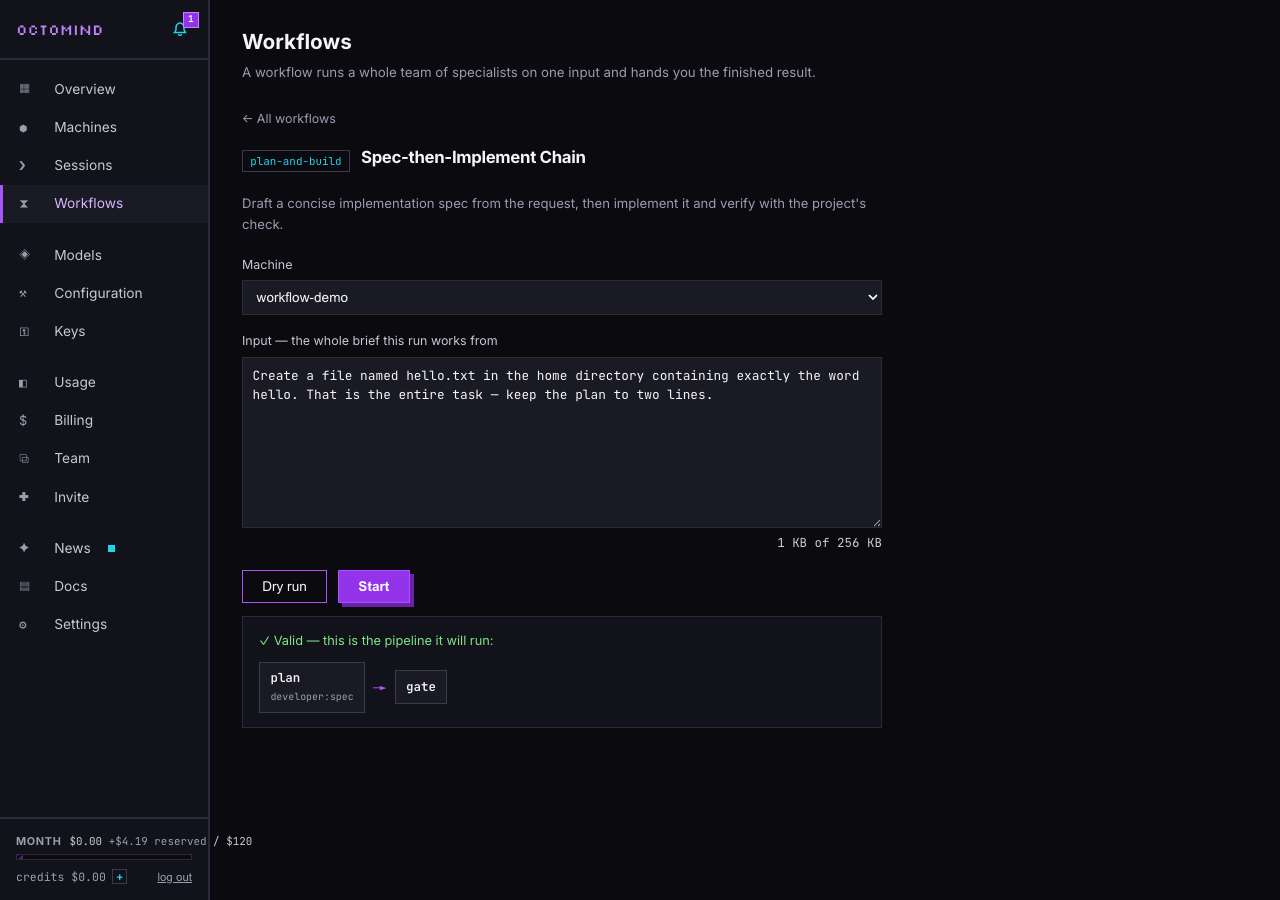
The Dry run button is the part I'd point at first. It validates the workflow on the machine itself and renders the resolved pipeline — every step, every role, the loop caps — without spawning anything or reading your input. It's free, it takes a couple of seconds, and it means a broken pipeline fails before a single token burns. Starting a real run performs the same validation again on its own, so the button is a preview, not a chore.
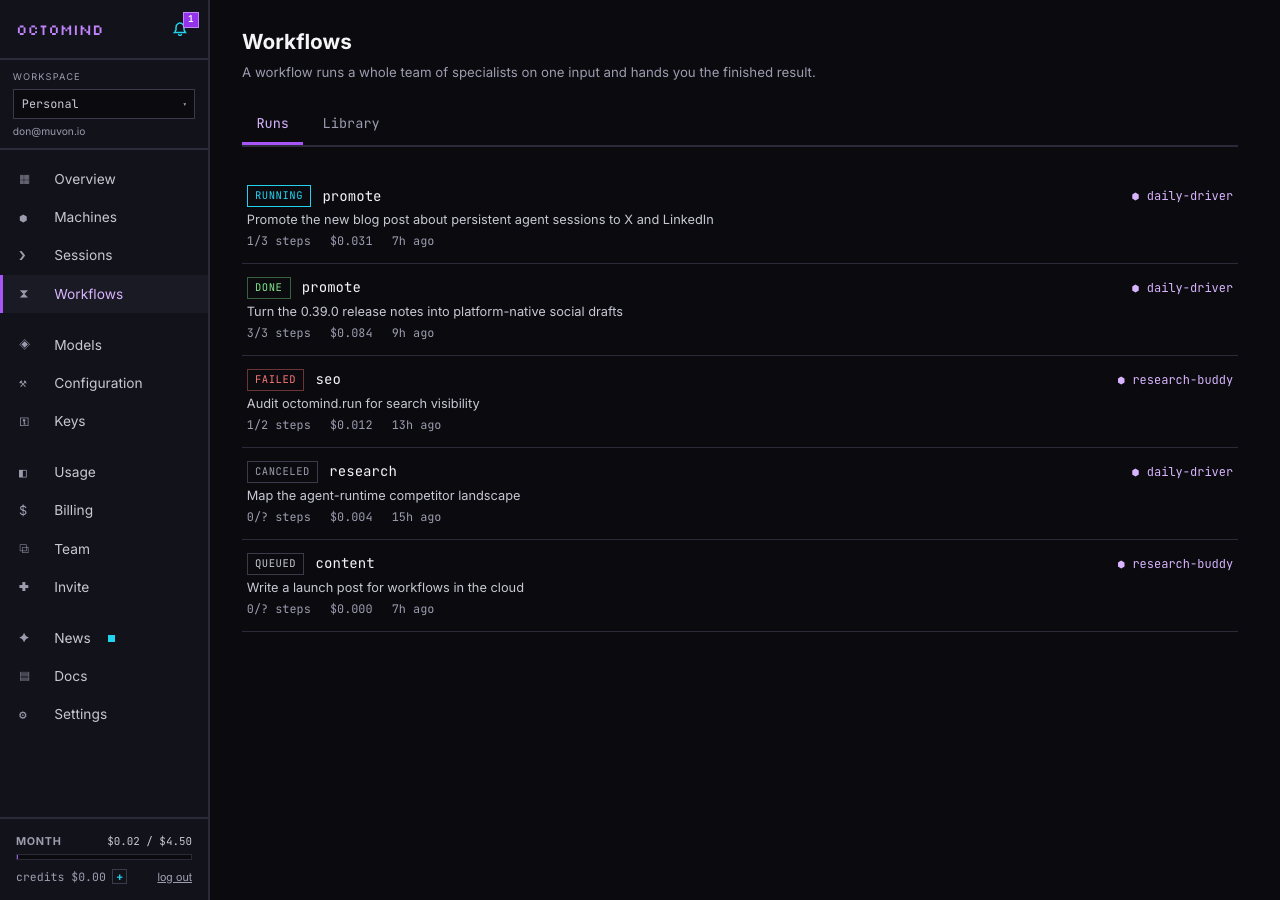
Then the run page becomes the thing worth watching: the whole chain renders immediately from the validated plan, and steps light up as the stream comes in — a checkmark when a step completes, a spinner on the one running, a pass counter on loops as the auditor sends drafts back. You can close the tab and come back; the run belongs to the machine, not to your browser.
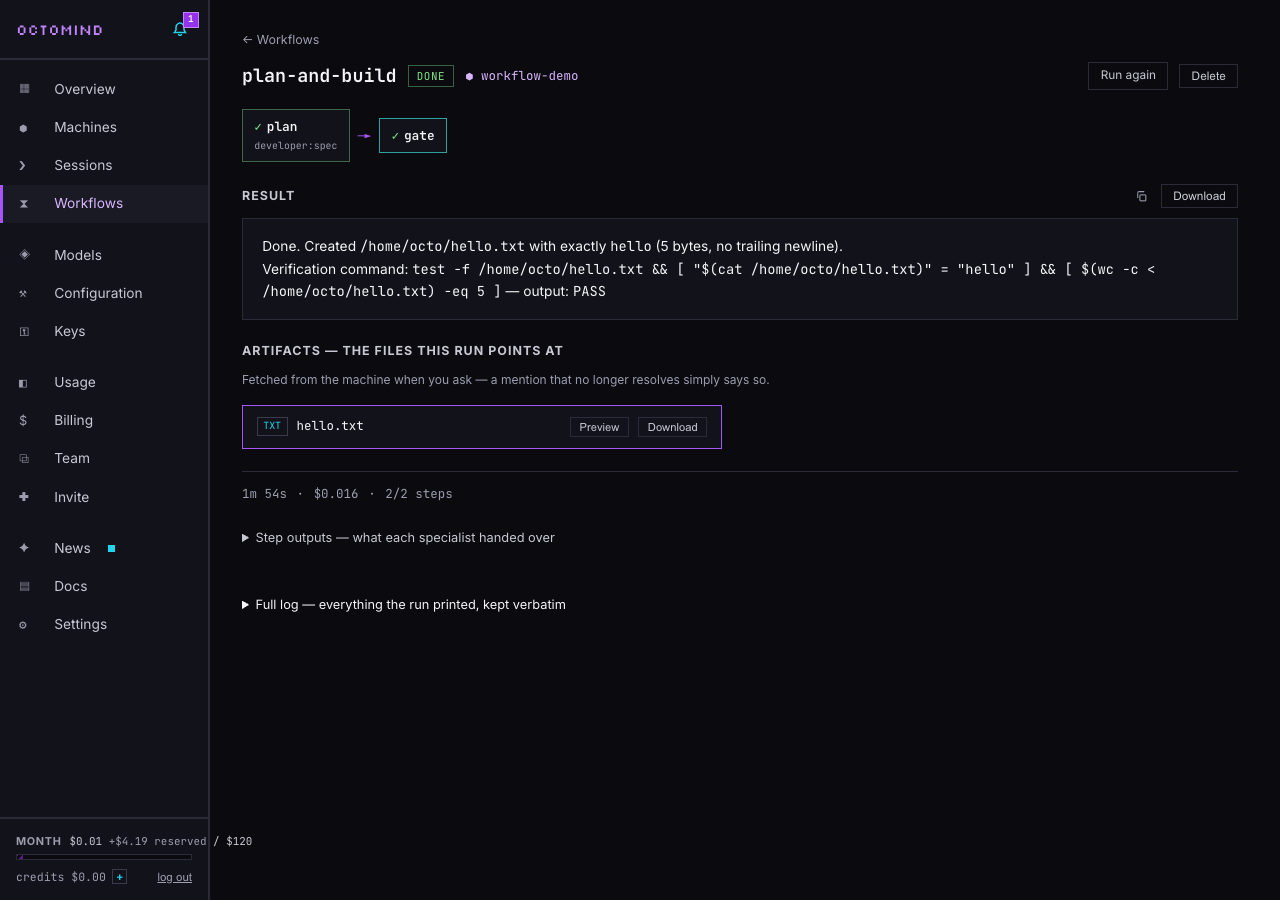
Under the result there's a detail we're calling artifacts. Workflow deliverables are often files — promote writes drafts, report renders a document — and the final message names the paths. The panel picks those mentions out and turns each one into a download chip, with inline previews for images and text. Nothing is fetched until you click — the mention is just a string until you ask for the file, which is also the security posture: text can name a path, but only you can fetch one. Sessions got the same mechanic: when an agent in a chat says it saved something, the file is right there to grab.
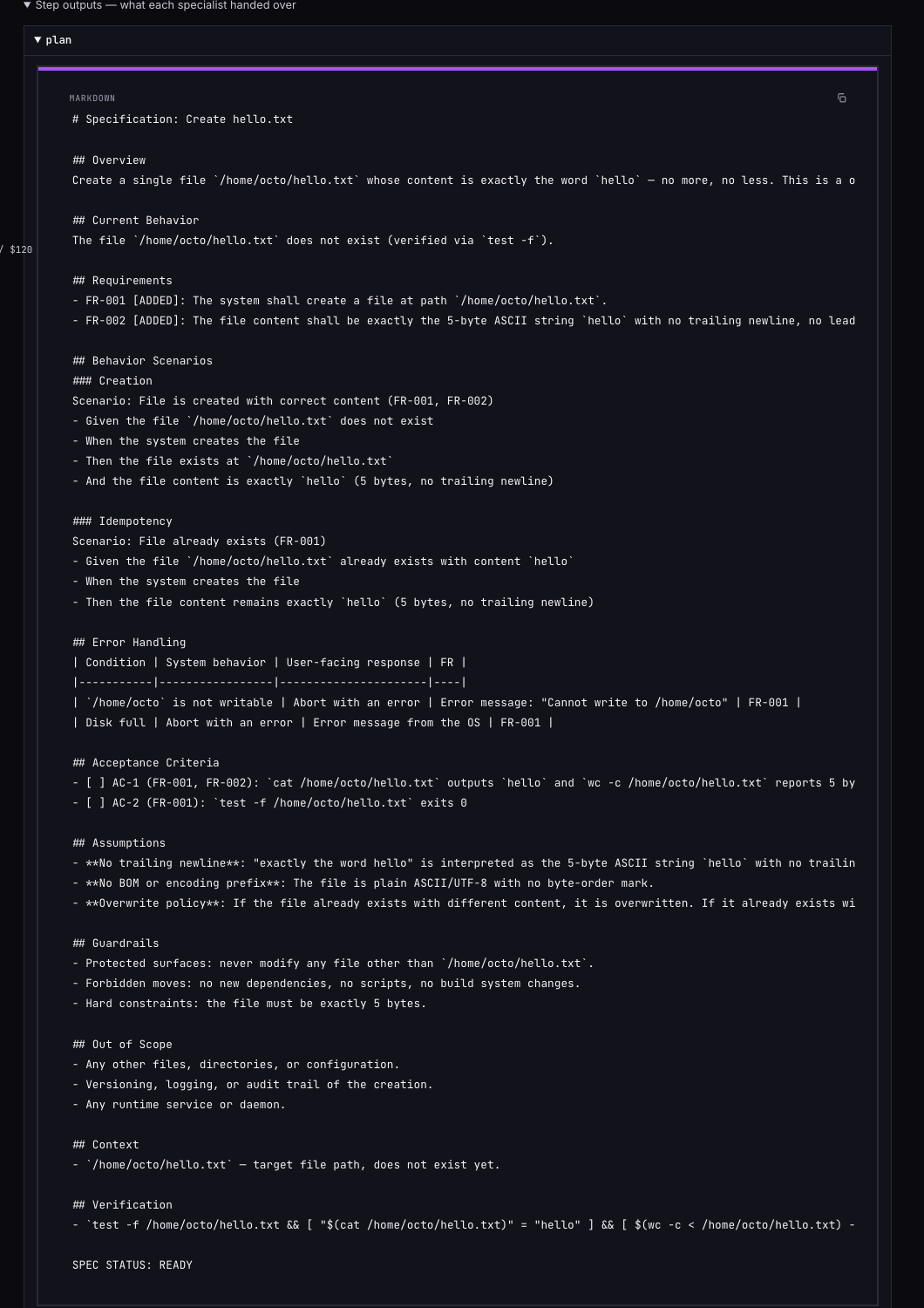
Everything the run printed is kept, verbatim. The collapsible full log holds the validated plan, the machine-readable event stream, and the human progress view — downloadable, nothing summarized away. Step outputs get their own friendly view too, so you can read what each specialist handed to the next — here's the spec a two-line request turned into before a single line was implemented:
Honest one-shots
A workflow run has five states — queued, running, done, failed, canceled — and the last three are final. There is no resume, no retry-in-place, no "continue from step 3". The CLI has no such mode, and we didn't fake one in the UI: partial re-execution of a pipeline whose earlier steps fed later ones is a good way to get confidently wrong output.
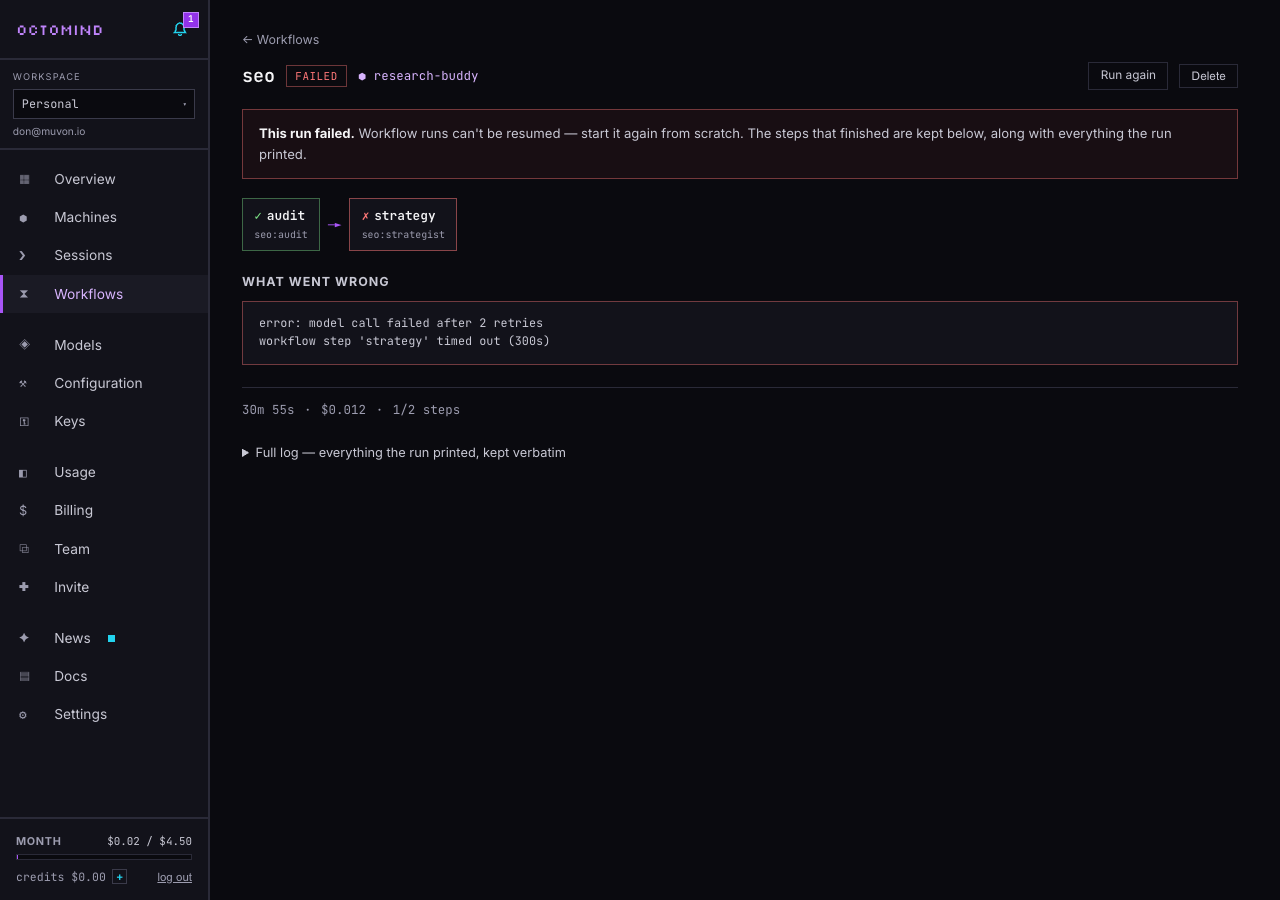
So a failed run tells you plainly what went wrong — the actual stderr tail, not a shrug — keeps every completed step's output visible (that spend was real, and the work is often still useful), and offers exactly one recovery: Run again, which pre-fills a fresh run with the same workflow and input. Your runs list is history you can trust: what ran, what it cost, what came out.
What it costs: nothing new
There's no workflow fee and no new meter. A run's model calls flow through your account's hub key exactly like a session's — plan caps and credits decide, per published prices — and the machine bills per second while it works, like always. The run page shows the aggregated cost the pipeline reported, so you can see what a promote actually costs you end to end (on the open models, typically cents). Dry runs are free. And workflows are on every plan, free tier included — the free tier's one-at-a-time model calls just serialize the steps, which makes runs slower, not smaller.
Same contract as the CLI
If you already run workflows from the terminal, nothing changed and everything got a second surface. The panel drives the same octomind workflow binary on your machine, with the same tap resolution and the same machine-readable output contract the CLI exposes via --format jsonl — one event per completed step, one aggregated cost at the end. A pipeline you tested locally behaves identically in the cloud, because it is identical.
That's also the direction this is headed. Today the library is the public tap. The plan is for every account to get its own tap — personal workflows, edited in the panel with the same dry-run validation, distributed to your machines through the exact mechanism tap content already uses. One distribution system, not two.
If you haven't tried the cloud yet, it's open to everyone — no card, no invite. Create a machine, open Workflows, feed promote a blog post you like, and watch a team you didn't have five minutes ago argue itself into shippable drafts.