Someone on the n8n forum asked the editor's AI to build their automations and used up a month of AI credits in a few hours, with 5 of 12 workflows done. On the Zapier forum, a user asked Copilot to duplicate a Zap and it deleted it instead. A third found that a Switch node had been dropping half of their bot's messages with "No error, no log, nothing" (n8n community, September 2026).
We collected 24 complaints like these from forums, issue trackers and Hacker News while building the AI workflow builder that ships in Octomind Cloud today. A workflow here runs a team of AI agents on one input — a researcher, a writer, a reviewer — and hands you the finished result. Until today you could run the ones we ship. Now you can build your own: describe it in plain words and an agent drafts it, or put it together as steps you can read top to bottom, branches and loops included.
Eight complaints and the fix for each
| What goes wrong | What people reported | The fix, in any tool | In Octomind |
|---|---|---|---|
| The canvas turns into spaghetti | Connections in large workflows "cross over each other" (n8n, Jan 2026) | Keep the order of work a list; nest branches and loops inside it | Steps are cards, read top to bottom |
| A branch drops work silently | Messages that matched no Switch rule "just… vanished" (n8n, Sep 2026) | Every branch point needs an "otherwise" | Routes always end with Otherwise |
| Loops run away | An agent kept "looping indefinitely until hitting the error" of its recursion limit (LangGraph, Jan 2026) | Cap rounds per loop, steps per run and dollars per run | Round caps, a step limit, a spend cap |
| References break silently | A node renamed on paste "can easily lead to broken workflows without the user noticing" (n8n, Apr 2026) | Flag every reference that points nowhere, while you type | A wrong {{name}} turns its card red at once |
| Errors surface days later | "You find out three days later" (n8n, Aug 2026) | Validate while editing, and again before saving | Problems on the card; every save is a dry run |
| The AI says "done" when it isn't | Copilot said the Zap was ready "at least six separate times" while Publish stayed greyed out (a competitor's test, Aug 2026) | Run the AI's draft through the same check as a human save | Describe it is dry-run before it lands, result shown |
| Building costs are unpredictable | "I used up all of my AI credits in a few hours" (n8n, Sep 2026) | Bill the builder like any run and show what each draft cost | Each draft shows its cost; usage, not a separate quota |
| Work is lost on the way | "upon returning discarded changes" (Make, Mar 2026) | Keep the draft apart from the saved version | Drafts survive leaving the page; saving is your click |
Steps you can read instead of a canvas
For AI agent workflows, a list of steps reads better than a canvas, because most of them are a chain with a few side branches.
Most visual workflow builders give you a canvas: boxes and wires you place by hand. It holds up until the workflow grows. One n8n feature request describes large workflows where connections cross over each other and run through other blocks until the whole thing turns into "spaghetti", and asks for portal nodes just to keep it readable (n8n community, January 2026).
Our workflow editor is a list. Each step is a card that says who does the work — an agent from the library, 152 of them on a default machine — what it's told, and, if you want, which model it uses. Four kinds of block cover the shapes agent work takes:
- Step — one agent does one job.
- Side by side — several agents work at once, and their results are joined.
- Repeat until — a few steps run again until a check passes, with a cap on rounds.
- Branch — an earlier result picks what runs next.
A step can also run once for every item an earlier step listed, which is how "split the job into tasks and work them all at once" is built.
Under each card, one line says what it hands on and who reads it: {{brief}} — read by revise. That line answers the question a canvas makes you trace wires for: what does this step feed?
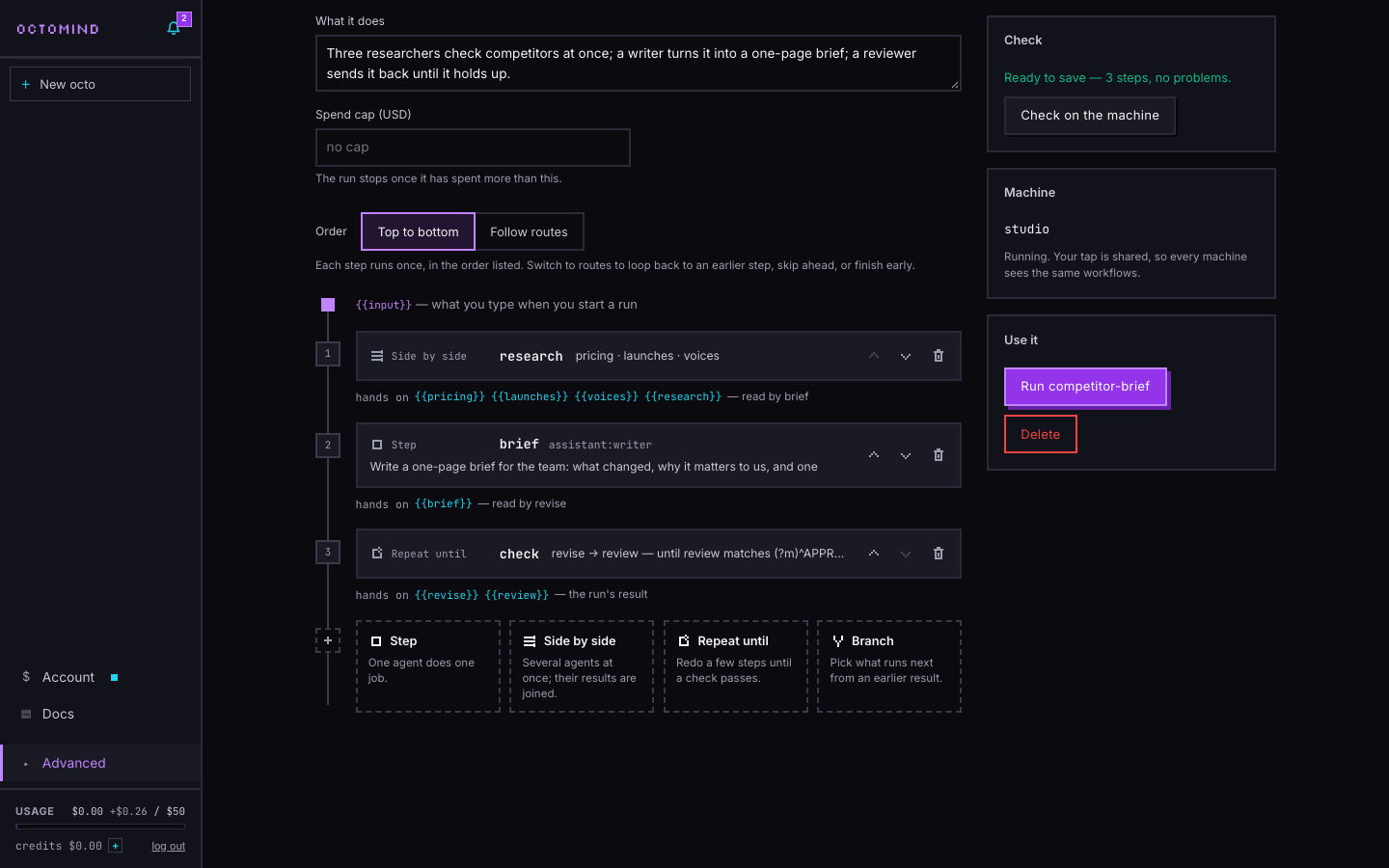
When is a canvas the better tool? When many outputs feed many inputs in arbitrary combinations. A list nests blocks; it doesn't draw free-form joins. For agent work it hasn't been a limit: all 18 workflows in our library open in it as steps.
Mistakes show on the card, not three days later
Check a workflow while it's being edited, then run the engine's own validation before anything is saved.
In n8n, node names are references, so a node renamed on paste "can easily lead to broken workflows without the user noticing" (n8n feature request, April 2026). And a run that goes green while a branch did nothing is found out when someone asks why the automation didn't run, "three days later" (n8n community, August 2026).
In our editor, earlier results sit as chips under every prompt. A click puts {{research}} where your cursor is, and only results that exist at that point in the workflow are offered. Rename a step and every prompt that used it follows. Type a name that doesn't exist and the card says so at once — in the screenshot, a typo turned {{research}} into {{reserch}}, and the card went red with "doesn't match any step". The Check panel on the right lists every problem with the step it belongs to.
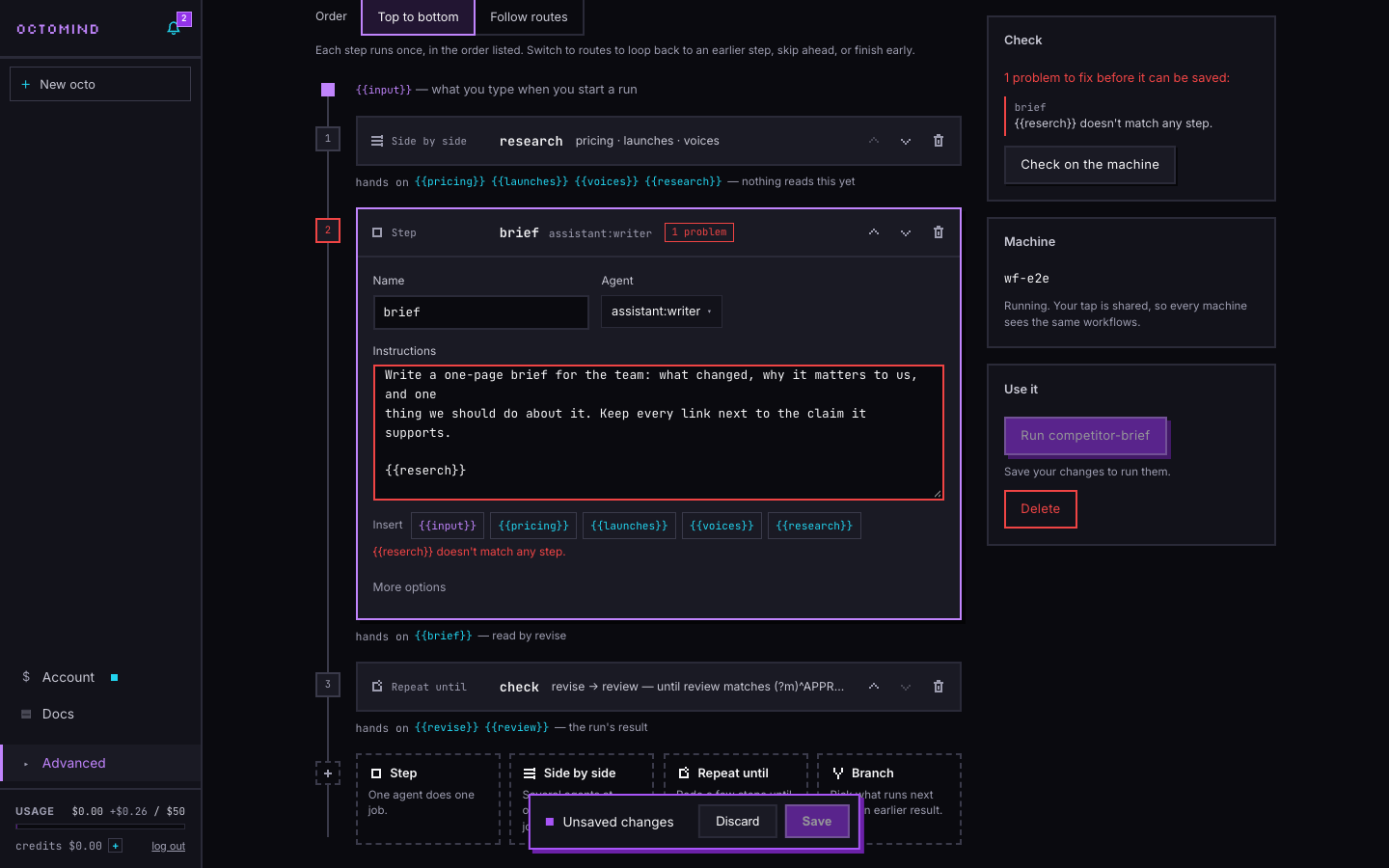
Check on the machine runs octomind's own dry run, the same validation the CLI applies before a run, and saving runs it too. A save the machine refuses writes nothing.
Branches and loops you can follow
Route on a fixed word the step must output, try conditions in a visible order, and always end with an "otherwise".
The n8n user who lost half their bot's messages had a Switch node with rules for commands and no fallback, so free text "simply had nowhere to go" (n8n community, September 2026). The engine logged what ran, not what didn't.
In our editor, switch Order from Top to bottom to Follow routes and every step gets a connector underneath: If … go to, Else if … go to, Otherwise go to. Conditions are tried top to bottom and the first match wins. The Otherwise route is required and pinned last, so nothing falls through. A route can go back to an earlier step, skip ahead, or straight to Finish, and the editor says which, in words, next to it.
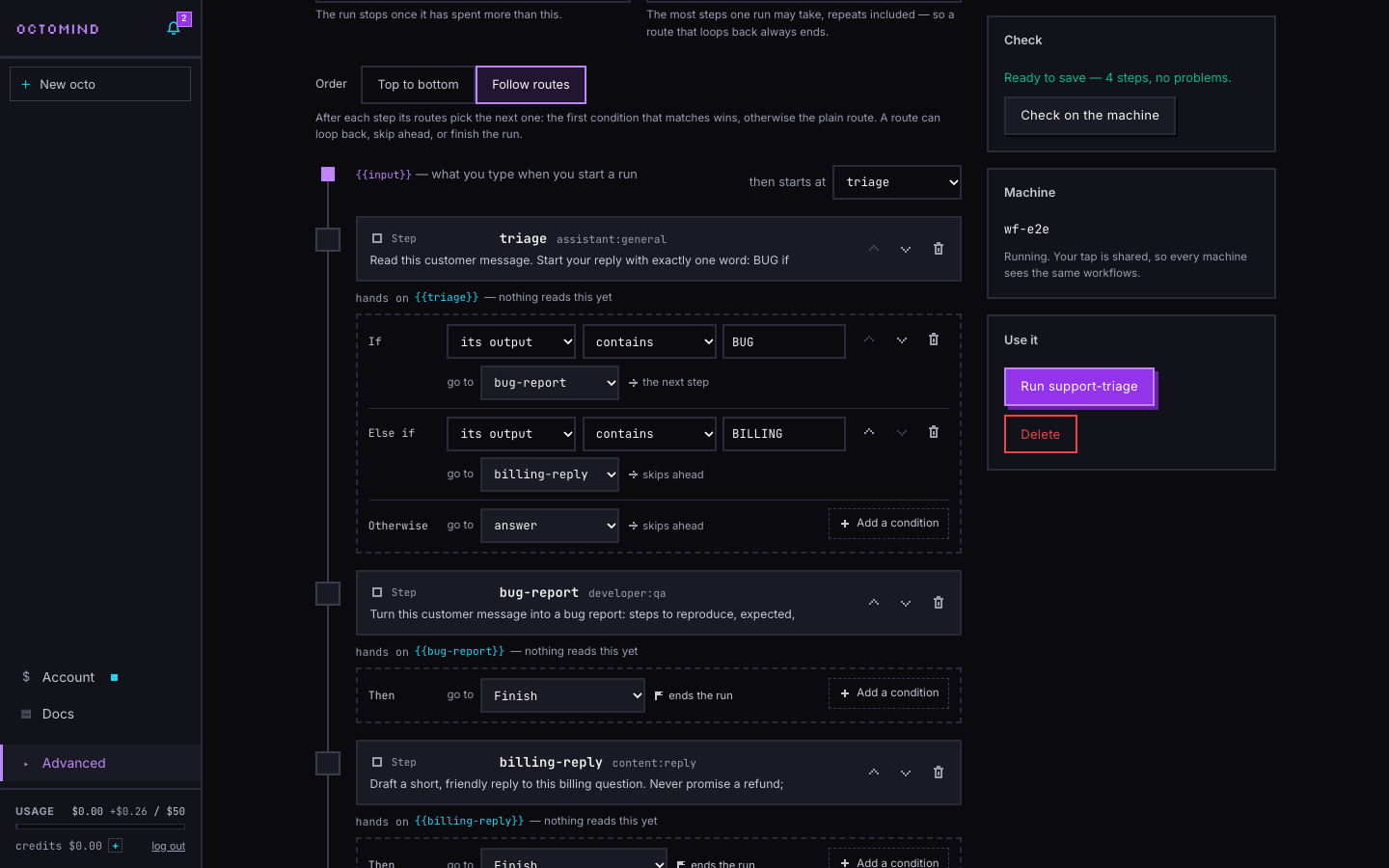
A route back is a loop, so routed workflows carry a step limit: the most steps one run may take, repeats included. Turning routes on sets it to three times the number of steps, never below 10. Repeat-until blocks have their own cap on rounds, and a spend cap in dollars stops a run once it has spent more. That's three ceilings against the runaway case from the table: a LangGraph agent that kept looping "until hitting the error" of its recursion limit, even though, its reporter writes, there was "clear evidence that the agent should be stopping" (LangGraph #6731, January 2026).
The routing step itself is where most branches go wrong, in any tool. Tell the deciding agent to start its reply with one word from a fixed list, and route on that word:
Read this customer message. Start your reply with exactly one word: BUG if
something is broken, BILLING if it is about money or plans, QUESTION otherwise.
Then one line saying why.
The screenshot routes on "contains BUG", which is fine for a demo. For real traffic, use matches the pattern with ^BUG: it only matches when the reply starts with the word, so a QUESTION reply that mentions "the BUG you fixed last week" isn't sent to the bug path.
Can AI create a workflow? Yes, if its work is checked
An AI workflow generator is worth using when its draft passes the same check as your own save, lands unsaved, and comes with what it assumed, what it changed and an undo.
Zapier's Copilot sets up as much of your Zap as it can directly — "This is the default" (Zapier Help, updated May 29, 2026) — and Zapier's own guidance is that "testing each step yourself helps you catch issues before your Zap goes live" (Zapier Help). A tester counted Copilot calling a Zap ready at least six times while it couldn't be published (Emergent, August 2026). n8n's built-in AI wrote a description for a group of nodes longer than the editor's 145-character limit, so it "cannot be saved" (n8n #37307, August 2026).
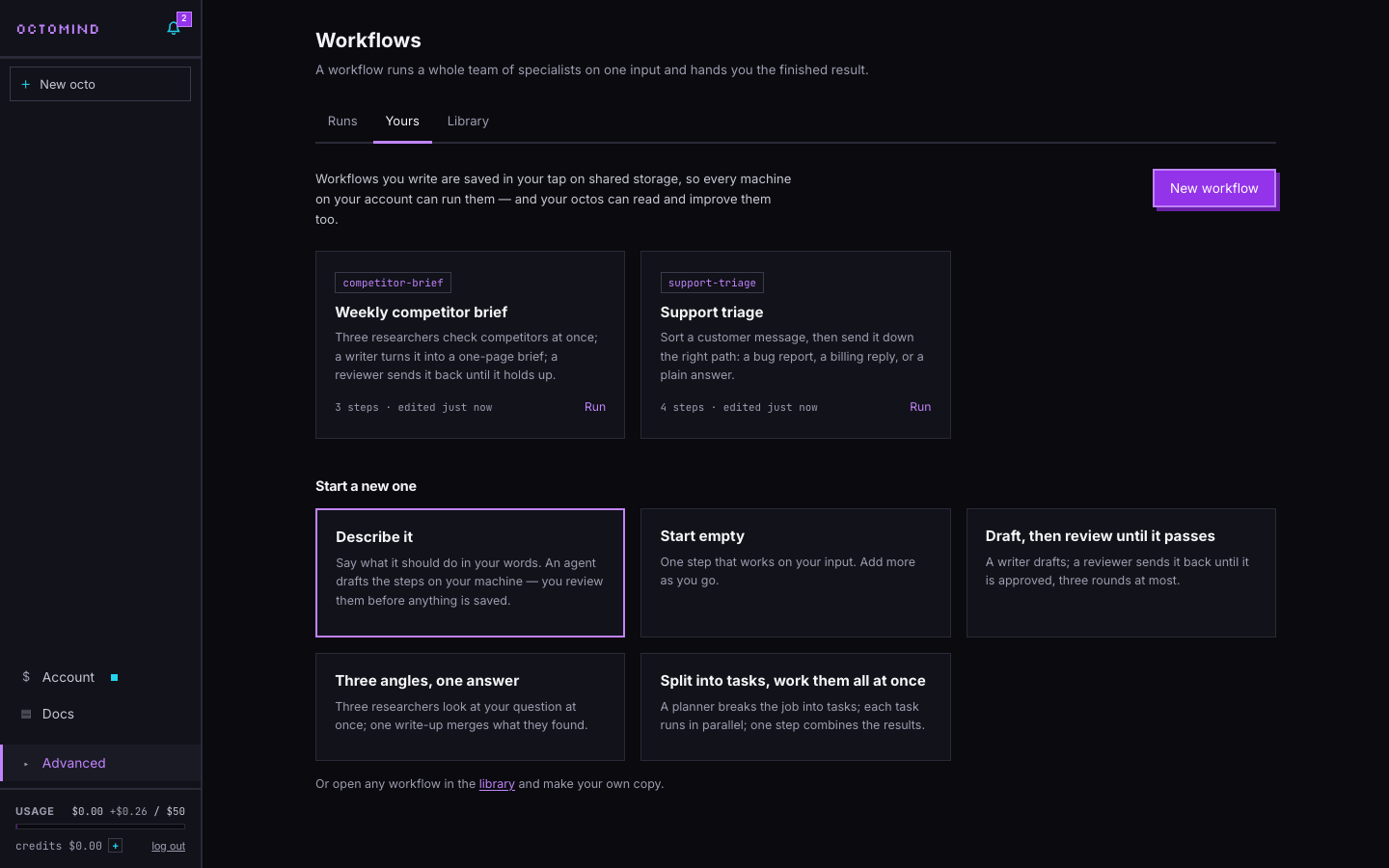
Press Describe it and, in the text-to-workflow box, say what the workflow should do. An agent writes it on your cloud machine, with every agent in your taps to choose from, and dry-runs it as it goes. Before the draft reaches you, the machine checks it again the way a save does; if that check finds a problem, it's shown under Check, and Save stays refused until it's fixed. The draft opens in the editor as steps:
- Nothing is saved yet. The banner says so, and saving is a click you make.
- It says what it assumed, in a few short bullets.
- It shows what it cost.
- One click undoes it.
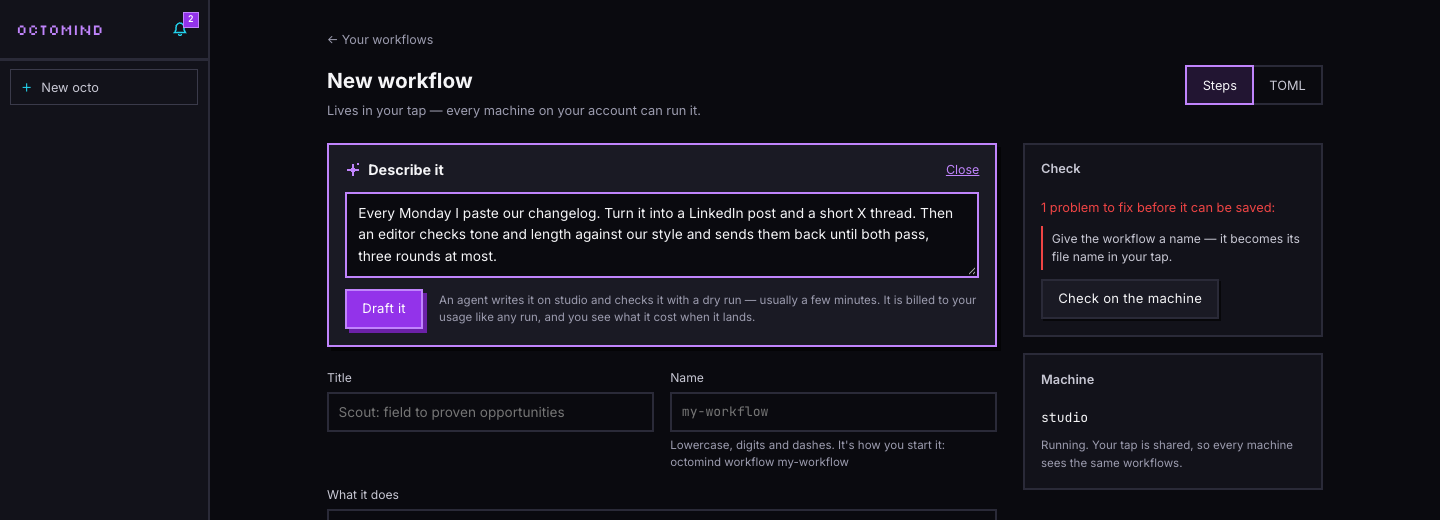
A draft is an ordinary agent run on your machine, so its model calls count toward your usage at the model's price plus 5%, the same as any other run. There's no separate allowance of builder credits to run out mid-project. In our tests, drafts took between 2½ and 7 minutes and cost $0.05 to $0.15 each. That's slower than a chat reply, because the agent tests its work on the machine before handing it over.
Ask for a change without a rewrite
The worst AI edit is the one that does more than you asked. "Duplicate and repurpose" became a deleted Zap in the thread above, and getting back in Zapier means Undo or Versions "if they're available", or checkpoints you save by hand — and once you revert to one, "you will not be able to revert to any earlier checkpoints until you create a new one" (Zapier Help).
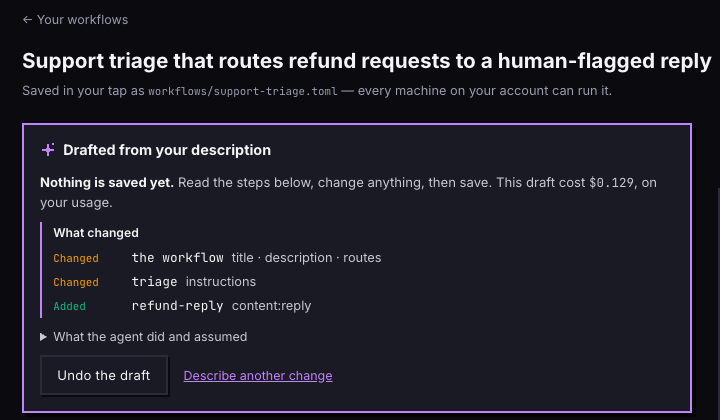
On a workflow you already have, the same box takes a change. The draft lands with a What changed list — steps added, removed and changed, and which settings moved — before anything is saved. Undo the draft puts back what was in the editor before you asked.
We asked Support triage: "If the customer asks for a refund, send it to a new step that drafts a reply and flags it for a person, instead of the billing reply." The draft took 345 seconds and cost $0.129. The list shows it added a refund-reply step, rewrote the triage step's instructions and changed the routes, which is what we asked for. It also retitled the workflow and rewrote its description, which we didn't ask for. That's what the list is for: you see the extra edits before they're saved, and keep or undo them.
Leave while it drafts
Keep two things apart: a draft that survives anything, and a saved version that only changes when you say so.
Builders get this wrong in both directions. Without autosave, a Make user "closed. upon returning discarded changes" (Make community, March 2026); Make shipped Scenario Recovery the next day, and called it "a recovery feature, not an autosave" (Make, March 2026). With autosave, an n8n user came back on a Monday unable to restore the known-good version "as the history exceeded 24 hours" (n8n community, February 2026). In Dify, navigating away and back resets the page, "equivalent to a full page refresh", running tasks included (Dify #38555, July 2026).
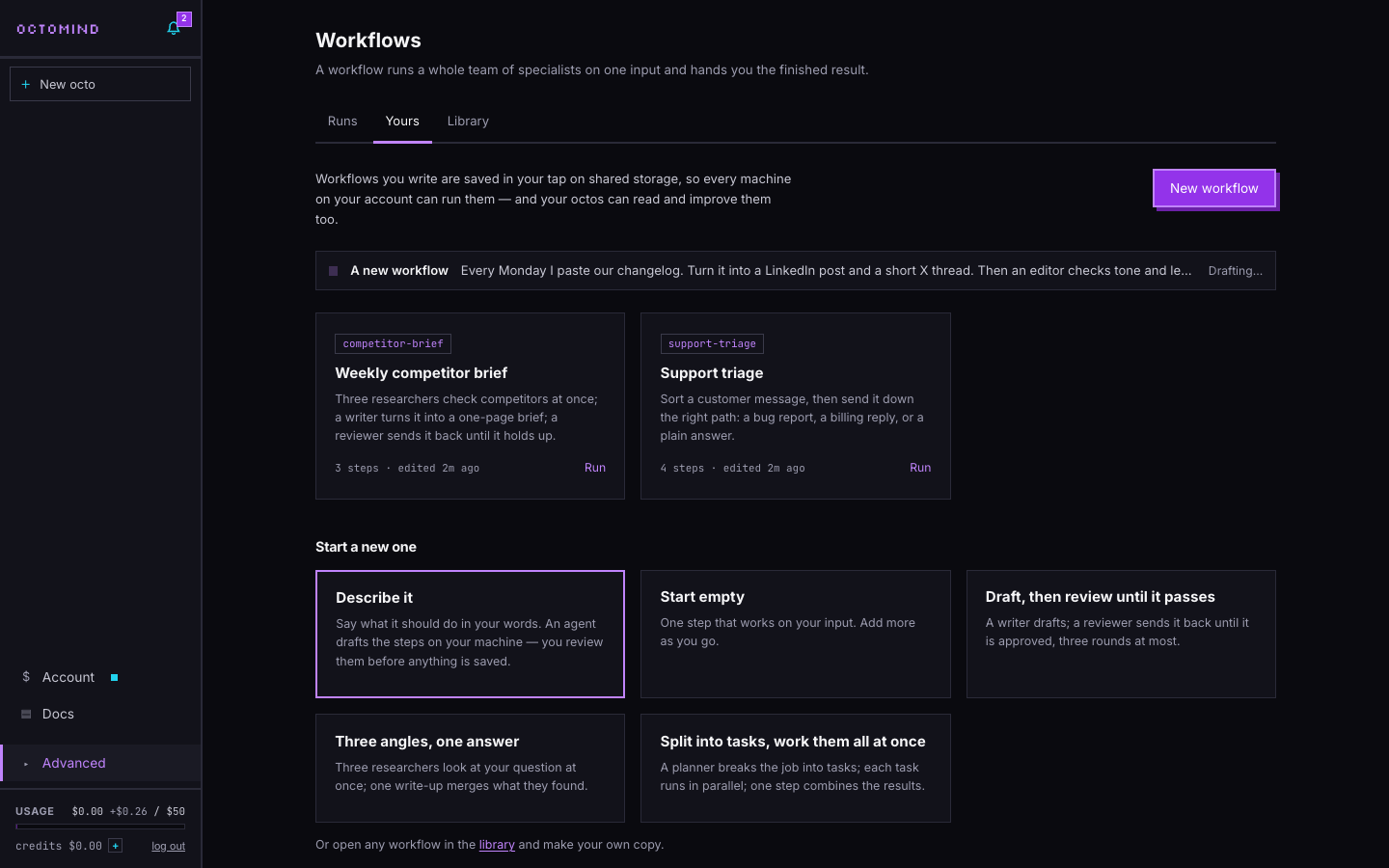
A draft takes minutes, so you shouldn't have to watch it. Once it's running, leave the page and it keeps going on your machine; the cloud keeps the machine awake until it finishes. Workflows → Yours lists it with its state, from Drafting… to "Ready — open it to review". Open it and it lands in the editor, still unsaved.
Your saved workflow changes only when you press Save. If the same workflow was saved from another tab in the meantime, the second save asks before it overwrites the first.
The file is still yours
Steps and TOML are two views of one plain-text file. A developer who manages n8n workflows in Git wrote pull-and-push scripts because n8n is "UI-first" and "You can't diff changes between two versions" (mfyz.com, May 2025). n8n has since added workflow diffs on some plans (pricing), but the point stands: a workflow you can't read as text is hard to review.
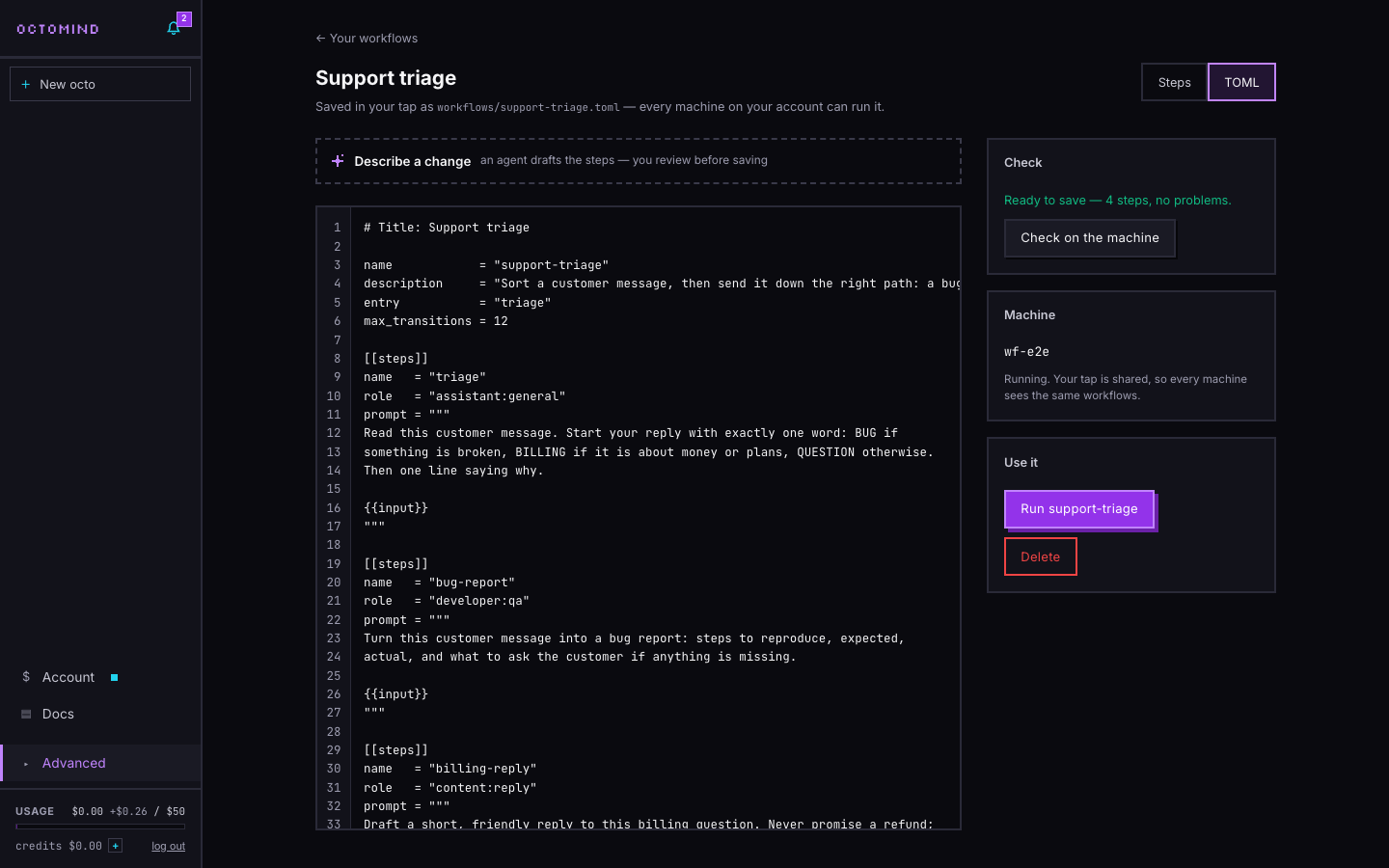
Switch to TOML and you edit the same workflow as text, and an error tells you its line. It's saved as workflows/<name>.toml in your own tap on your account's shared storage, so every machine on the account can run it and an octo can read and improve it in chat. The format is the open-source octomind's own, documented in the workflows guide, so the file runs with the CLI on your laptop too.
How it compares to n8n and Zapier
Each AI workflow builder answers the same four questions differently. Checked against the vendors' docs and pricing on October 6, 2026:
| n8n Assistant (preview) | Zapier Copilot (beta) | Octomind Describe it | |
|---|---|---|---|
| Where the AI's work goes | A normal workflow in your project; publishing and deleting ask first (docs) | Built into the Zap directly by default; "Ask as you build" asks first (help) | An unsaved draft in the editor |
| Checked before you see it | It tests what it builds; the docs still say generated workflows may need manual review and correction | The docs advise testing each step yourself | octomind's dry run on your machine, every time |
| Getting back | Version history: 24 hours for everyone, 5 days on Cloud Pro (docs) | Undo or Versions where available, or checkpoints you save by hand (help) | Undo the draft; the saved file changes only on Save |
| What building costs | Assistant credits by tokens: 1,600 a month on Starter, 4,000 or 9,600 on Pro, extra credits for sale (pricing) | None of your plan's tasks; a daily message limit on Free (help) | Model usage at cost plus 5%; $0.05–$0.15 a draft in our tests |
Where they're better: n8n, Zapier and Make connect apps on triggers. Zapier's own example is "When a customer makes a payment in Quickbooks, find the customer's open deal in Hubspot, then mark it as closed" (Zapier Help), and n8n's is a workflow that checks Gmail every morning for invoices (n8n docs). That isn't what this is. An Octomind workflow is a team of AI agents with tools on a cloud machine, started from the panel, the API or the CLI. If the job is moving data between SaaS apps, use them. If it's research, writing, reviewing and code done by agents, this AI agent workflow builder is built for it.
For the general case, our guide to AI agent workflows covers the patterns, and workflows in the cloud covers running them.
What it doesn't do yet
- No canvas. Free-form many-to-many joins can't be drawn.
- Routes read text. A condition tests a step's output with "contains" or a regular expression, not structured fields.
- Drafts need a running machine and take minutes. Waking a sleeping machine is one click.
- No app triggers. Runs start from the panel, the API or the CLI.
A checklist for any agent workflow
Whatever builder you use, these seven rules prevent most of the failures above:
- Every branch point has an "otherwise" route.
- A deciding step starts its reply with one word from a fixed list, matched with an anchored pattern like
^BUG. - Every loop has a round cap, and every run has a step limit and a spend cap.
- A reviewer ends with exactly one line, APPROVED or REVISE, and the loop exits on
(?m)^APPROVED. - Earlier results are inserted by the editor, never retyped.
- An AI's draft passes the same validation as your own save, and you read what it changed before you keep it.
- Drafts and saved versions live apart.
Workflows → Yours is live in the panel now, under Advanced. If you're not on a cloud plan yet, Octomind Cloud starts at $20 for the first month.