Claude Code output styles change how Claude responds for an entire session — its role, tone, and response format — without changing what it knows about your project. If you keep re-typing "be concise" or "explain your reasoning" in every prompt, an output style sets that once.
The short answer: an output style is a block of instructions added to Claude Code's system prompt. Pick a built-in style (Proactive, Explanatory, or Learning) or write a custom one, set it through /config → Output style, and it applies to every response until you change it. For project facts use CLAUDE.md; for something that must happen every time use a hook.
What is an output style?
An output style is a set of instructions that sets Claude's role, tone, and output format for every response in a session (Claude Code docs). It modifies the system prompt. It does not add project knowledge, and it does not guarantee a behavior the way a hook does — it is guidance Claude follows, not a hard rule.
That distinction decides when to reach for one. Use an output style when you want a different voice or working manner across the whole session: shorter answers, explanations alongside code, or a Claude that acts as a writing assistant instead of a software engineer.
The built-in styles
Claude Code starts in Default, its standard system prompt for software engineering tasks. The other built-in styles keep those engineering instructions and add their own:
| Style | What changes | Reach for it when |
|---|---|---|
| Default | No style instructions; standard engineering prompt | You want the normal coding behavior |
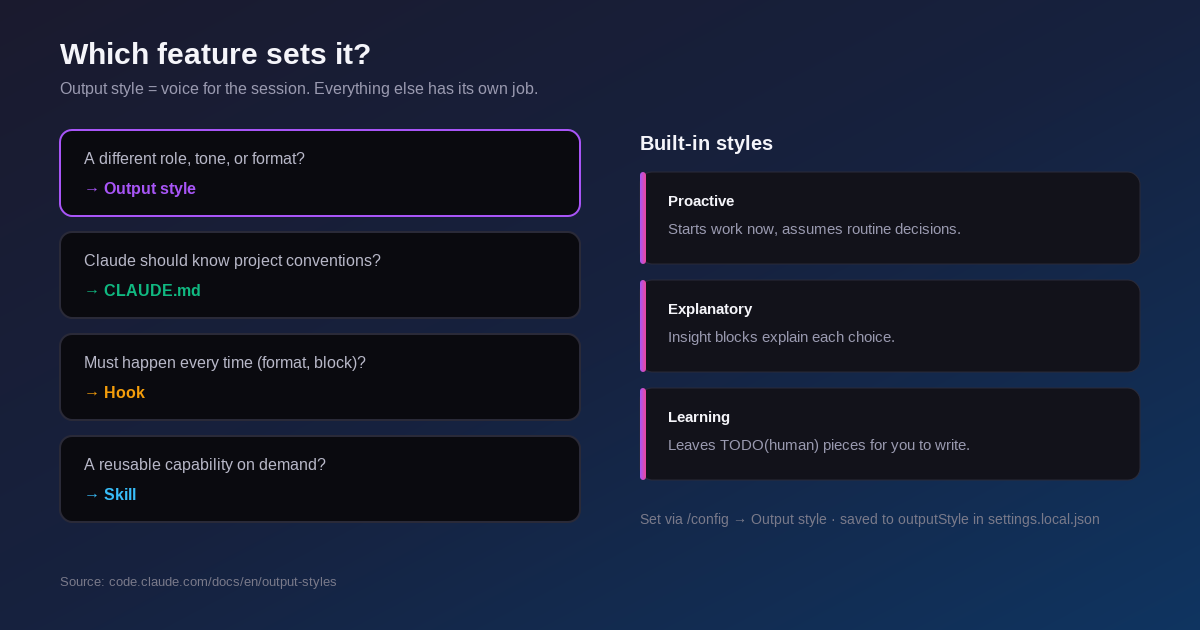
| Proactive | Claude starts work right away and makes reasonable assumptions instead of asking about routine decisions | You want momentum and will correct course if an assumption is wrong |
| Explanatory | Adds short "Insight" blocks explaining the choices behind the code | You are learning a codebase and want the reasoning with the change |
| Learning | Explains choices and leaves small pieces of code for you to write, marking them TODO(human) | You want hands-on practice while the task still gets done |
Proactive is stronger autonomous-execution guidance than auto mode applies, and it works without changing your permission mode — your permission mode still decides what runs without asking (docs).
How to switch styles
In the terminal, run /config and select Output style to pick from a menu. Claude Code saves the selection to the outputStyle field in .claude/settings.local.json at the local project level. You can also edit that field directly:
{
	"outputStyle": "Explanatory"
}
The standalone /output-style command was deprecated in v2.1.73 and removed in v2.1.91; use /config or set outputStyle directly (docs). Because the style is part of the system prompt, it is read at the start of the session's context — switch it before you dive into a long task, not halfway through.
Write a custom output style
A custom style adds your own instructions to the system prompt and lets you choose whether to keep Claude Code's built-in software engineering instructions:
- Keep them when you are changing how Claude communicates but still coding — for example, always answering with a diagram.
- Leave them out when Claude is not doing software engineering at all — a writing assistant or a data analyst.
Write the instructions as factual statements about the role and format you want. For anything about your project, conventions, or codebase, use CLAUDE.md instead — that is the place for static project knowledge, and it loads without a style.
Output style vs CLAUDE.md vs hooks vs skills
These four features are easy to confuse. The deciding question is what kind of thing you are trying to set:
| You want | Use | Why |
|---|---|---|
| A different role, tone, or format for the session | Output style | It edits the system prompt's voice |
| Claude to know your project's conventions | CLAUDE.md | Static project facts, loaded every session |
| Something to happen every time (format after edit, block a command) | Hook | Deterministic shell/HTTP/MCP action at a lifecycle event |
| A reusable capability Claude invokes on demand | Skill | Packaged instructions and tools, loaded when relevant |
An output style gives instructions; a hook enforces an action. If "always run the formatter after an edit" matters, a style cannot guarantee it — a PostToolUse hook can.
When an output style is the wrong tool
Skip a style when the need is project knowledge (CLAUDE.md), a guaranteed action (hook), or a one-off request (just ask in the prompt). A style is for a persistent manner you would otherwise repeat every turn. Setting Concise-style brevity once beats pasting "be brief" into forty prompts.