A personal AI agent for each thing you run.
The blog, the shop, Client X, your own admin: give each one its own octo. It remembers its job, runs on your schedule and reports back in Telegram, WhatsApp or Slack.
Every Monday at 9, check my two competitors' pricing pages and tell me in Telegram only what changed.
Nothing to install — working in 60 seconds. Cancel anytime.
How it works
-
Name a personal AI agent for one thing
Type the job in plain words. Your first job creates an octo; call it Blog, Shop or Client X, and it keeps its own folder, instructions and memory for that one thing.
-
It does the work on a cloud computer
It browses, reads, writes files and runs what it needs on a cloud machine, so your laptop can stay closed. Say "every Monday" and the job becomes a routine.
-
The result comes to your chat
It replies in Telegram, WhatsApp, Slack or the panel. A routine can report only when something changed, so a quiet week costs you one line or nothing.
Jobs to hand over
Competitors: know when their prices change
Every Monday at 9:00You say:“Check zapier.com/pricing and n8n.io/pricing. Compare them against what you found last time and tell me only what changed: prices, plans, wording. If nothing changed, say so in one line.”
What comes backThe first run saves a baseline; every run after that reports only the differences, or one line saying nothing changed.
The blog: a week of posts, ready to paste
Every Monday at 9:00You say:“Write five post ideas with ready-to-paste captions based on what people are talking about this week. Match this tone: plain, a little dry, no hype, no emojis.”
Your niche: a three-line morning brief
Every weekday at 8:00You say:“Find what is new about AI agents and automation tools since yesterday and write me a brief: the three things that actually matter, one line each, with links.”
What comes backThree lines with links in your chat before you start the day.
A decision: a straight answer with sources
OnceYou say:“Research Stripe vs Paddle for a two-person startup selling subscriptions worldwide: fees, sales tax and VAT, payout times. Write report.md with sources, then give me the short version.”
What comes backA sourced report in its files and the short version in the chat.
See the real result →Personal admin: watch one price for you
Every day at 18:00You say:“Check this standing desk page every evening and message me in Telegram when it drops under $400: <link>”
What comes backA Telegram message with the price and the link when it drops under $400.
One screen, one octo per thing
This is the panel's home on a real account: Blog, Acme app, Competitors, Research and Money, each a tile showing its state, what it last did, when it next acts and what it cost this month. On a demo run on 10 October, a Competitors octo saved a first snapshot of two pricing pages, and its next check the same day answered in one line: nothing changed. That whole conversation cost $0.66.
Read how octos work →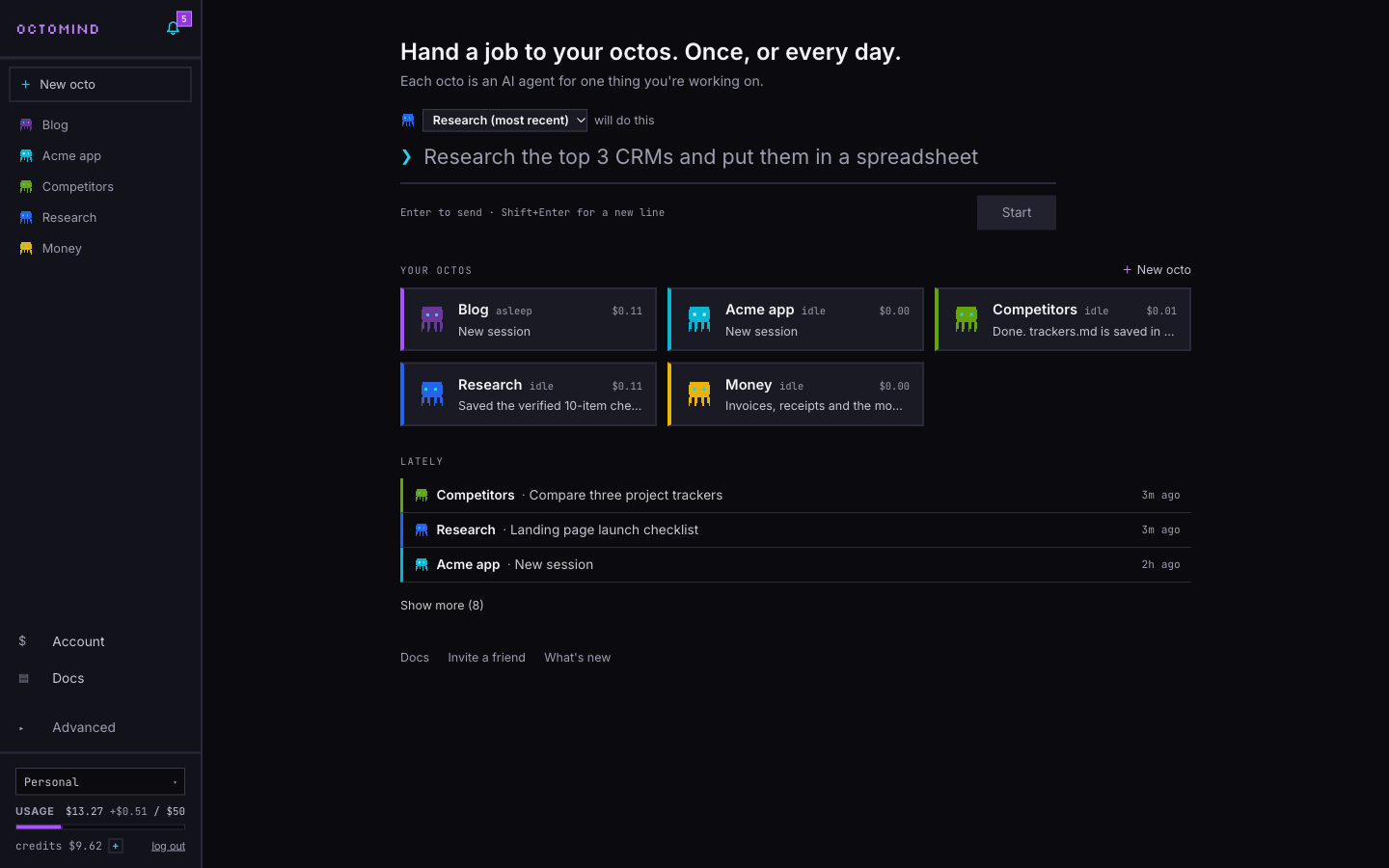
What it doesn't do
It cannot open your Gmail, Outlook or calendar.
There is no inbox or calendar connector. Give an octo an email address and forward or CC mail to it (only senders you allow get through), or paste the message or a screenshot into the chat.
Octos sleep when there is nothing to do.
After an hour idle by default, its machine suspends and costs only storage. A message or a routine wakes it, so it is not watching anything between runs: put whatever needs checking on a routine.
It reaches you in Telegram, WhatsApp, Slack, Discord or GitHub.
Plus an email address you forward or CC mail to. There is no iMessage, Signal or SMS connection; for anything else, use the panel.
The free plan has no octos.
Free is the model hub on its own: no cloud machine, no routines, no chat connections. Octos start on Pro, $20 for the first month, then $50 a month. Read more →
Octos on one machine share it.
Each octo has its own folder, which keeps work tidy but is not a security wall. Give an octo that holds a client's logins a machine of its own.
Questions
What is a personal AI agent?
An AI that does a job for you on its own: you say it in plain words, and it browses, writes and runs what it needs, then sends you the result. On Octomind Cloud each one is an octo for one thing you run, with its own folder, instructions, memory and schedule.
Can I have more than one?
Yes. Pro allows 10 octos and Max 30, and several share one machine (a Small holds five), so they share one compute bill. Give each one thing to look after: the blog, the shop, a client or your admin.
How much does a personal AI agent cost?
Pro is $50 a month, $20 for your first month, and includes $50 of usage. Models bill at the provider's price plus 5%, machine time at $0.04 per vCPU-hour and memory at $0.012 per GB-hour while awake, and a sleeping octo costs only storage. Past the allowance it spends prepaid credits at the same prices.
What is the best AI agent for personal use?
It depends on how your life splits up. One assistant for everything, like OpenAI's Dots at launch, holds all of it in one place; an octo only ever sees one workstream, so it knows what it is for, and each can run on a different model. If you mostly want your Gmail and calendar handled, an assistant with those connectors fits better today.
Does it work while I am away?
Yes, on a schedule. A routine wakes the octo at the time you set, runs the job with a spending cap per run and sends you the result; between runs it sleeps.
Do I need to code or bring API keys?
No. You type the job in plain words, and every model comes through the built-in gateway, billed from your plan.
More from Octomind Cloud
- No-code agent builder Say the job in one sentence and get an agent with a cloud machine, memory and schedule.
- Agent hosting Skip the Mac mini: a managed machine that wakes for the job and sleeps for storage cost.
- Competitor monitoring Checks rivals' pricing and feature pages on your schedule and tells you only what changed
- Telegram AI agent Text your octo in Telegram: it does the job on its own computer and replies there
Reading
Sixty seconds to your first octo.
Subscribe and hand it the job — $20 your first month, cancel anytime. Nothing to install, so nothing to uninstall.