A Telegram AI bot that does the job and texts you back.
Message your octo like you would a person. It works on its own cloud computer, so it can browse, write files and run code, then answers in the same chat. Jobs you put on a schedule report there too.
Every weekday at 8, send me the three AI agent stories that matter, one line each, with links.
Nothing to install — working in 60 seconds. Cancel anytime.
How it works
-
Connect the Telegram AI bot in one click
In Settings, Connections, press Connect Telegram, open the bot and press Start. Prefer your own bot? Paste a token from @BotFather instead and it runs on that.
-
Send it a job, a photo or a voice note
Your message wakes the octo on its own machine. It browses, writes files and runs what it needs there, so your phone only carries the conversation.
-
The answer lands in the same chat
The reply comes back where you asked, with any image it made. Routines you set up deliver their report there, and /mute quiets the alerts.
Jobs to hand over
A morning brief in your Telegram
Every weekday at 8:00You say:“Find what is new about AI agents and automation tools since yesterday and write me a brief: the three things that actually matter, one line each, with links.”
What comes backThree lines with links in your chat before you start the day.
A straight answer while you are out
OnceYou say:“Research Stripe vs Paddle for a two-person startup selling subscriptions worldwide: fees, sales tax and VAT, payout times. Write report.md with sources, then give me the short version.”
What comes backThe short version in Telegram and a sourced report in its files.
See the real result →A week of posts from one message
Every Monday at 9:00You say:“Write five post ideas with ready-to-paste captions based on what people are talking about this week. Match this tone: plain, a little dry, no hype, no emojis.”
A whiteboard photo turned into a task list
OnceYou say:“Turn this whiteboard photo into a task list with owners and dates, and save it as tasks.md.”
What comes backA clean list in the chat and tasks.md in its files.
A voice note on the walk home
OnceYou say:“Find three US shops selling an electric standing desk, at least 55 inches wide, for under $400, and send me the links with prices.”
What comes backYour words transcribed, then three links with prices as a reply.
An image for tonight’s post
OnceYou say:“Make a square image of a ceramic mug on a sunlit café table for an Instagram post, warm light, no text.”
What comes backThe picture arrives in Telegram as a photo, and a copy stays in its files.
One button, or your own bot
This is the Connections screen on a real account, captured for our August post on chat connectors: Connect Telegram for the official bot, or use your own bot with a token from @BotFather. The connection itself costs nothing; what the octo does is billed exactly like the panel. Once it is linked, the bot answers with the same octo, the same conversations and the same files you see in the panel.
Read how the chat connectors work →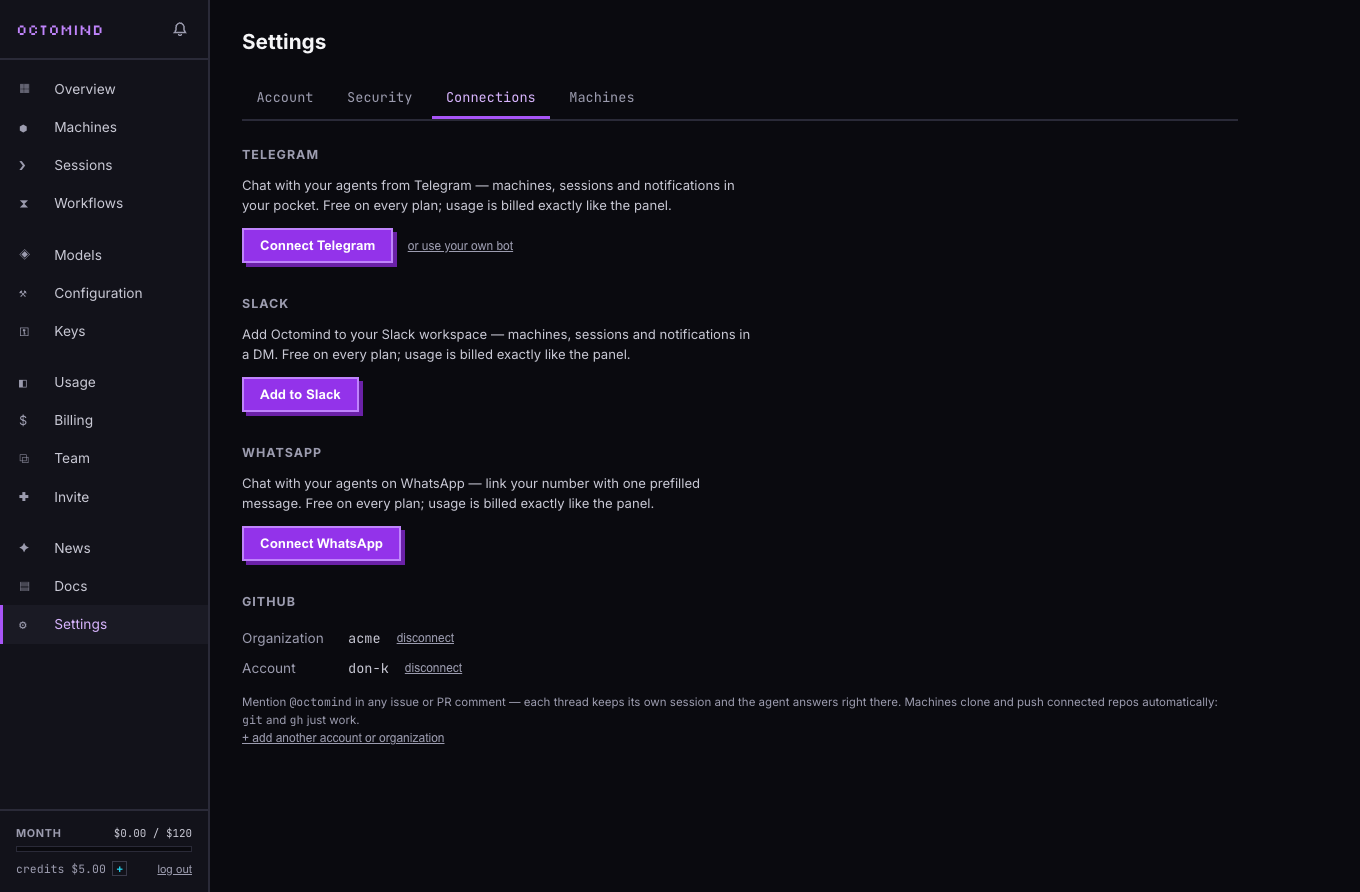
What it doesn't do
Telegram needs a paid plan.
Free is the model hub on its own, with no octos and no chat connections. Telegram comes with every cloud plan, starting at Pro: $20 for the first month, then $50 a month with $50 of usage included. Read more →
It reads photos and voice notes, not other files.
Photos up to 5 MB and voice notes up to 8 MB come through; a PDF or other document gets a reply saying it cannot read that file type yet. Send a link, paste the text, or send a photo of the page instead.
One octo answers in each chat.
Your direct chat goes to the octo you picked, or your most recent one, and /use switches. A group belongs to one octo: everyone there can talk to it, but only you can run commands, and its work is billed to your account.
It sleeps between jobs.
An idle machine suspends after an hour by default, and your next message wakes it. After 3 days asleep it is restored from cold storage, so that first reply takes a few minutes. For anything that needs checking, set a routine.
Self-hosted octomind has no Telegram connector.
The open-source engine takes work from a shell, a webhook or a timer. To use Telegram with it, point your own bot at a webhook listener behind TLS, with a script that turns updates into messages, and have the agent reply through the Bot API. Read more →
Questions
How is this Telegram AI bot different from a ChatGPT bot?
A ChatGPT bot answers from the model alone. Here the bot is a front door to an octo with its own cloud computer, files, memory and schedule, so it can browse, write a report, build a page or check something every morning and send you the result.
How do I add an AI bot to Telegram?
Open Settings, then Connections in the Octomind panel, press Connect Telegram, open the bot and press Start. To use your own bot, send /newbot to @BotFather and paste the token instead; it is stored encrypted and runs only your bot.
Can I add it to a Telegram group?
Yes. Add the bot and send a message yourself; with several octos you pick which one answers there. Everyone in the group can then talk to it, only you can run commands, and Release on the octo frees the group again.
Can it understand voice messages and photos?
Yes. Voice notes are transcribed for $0.010 a minute, and it can answer with a voice note too ($0.025 a minute) once you switch spoken replies on in Settings. Photos go to the model if it can see images.
Can it make images in Telegram?
Yes. Ask for a picture or a short video and it arrives in the chat after the text reply, with a copy kept in its files. Images start at $0.04 each.
How much does it cost?
Telegram is included with every cloud plan. Pro is $50 a month, $20 your first month, and includes $50 of usage; models bill at the provider's price plus 5%, and a sleeping octo costs only storage.
More from Octomind Cloud
- Personal AI agent Your own AI agent for each thing you run, reporting back in Telegram, WhatsApp or Slack
- No-code agent builder Say the job in one sentence and get an agent with a cloud machine, memory and schedule.
- Agent hosting Skip the Mac mini: a managed machine that wakes for the job and sleeps for storage cost.
- Competitor monitoring Checks rivals' pricing and feature pages on your schedule and tells you only what changed
Reading
Sixty seconds to your first octo.
Subscribe and hand it the job — $20 your first month, cancel anytime. Nothing to install, so nothing to uninstall.