Of the OpenClaw alternatives, the one that shows you the rules and the bill
Run octomind as one Apache-2.0 binary on your own box, or hand the job to octos on Octomind Cloud that answer in Telegram. Either way, what the agent may not do sits in a TOML file, and what it spent is on screen.
curl -fsSL https://octomind.run/install.sh | bash Or skip the install: Octomind Cloud runs the same engine for you.
Verdict: stay with OpenClaw or switch to octomind
Stay with OpenClaw if
- You talk to your agent over a channel we do not serve. OpenClaw lists 33 chat channels, including iMessage, Signal, Matrix and WeChat; self-hosted octomind has no chat connector at all.
- You install skills from ClawHub and want that registry one command away.
- You want the biggest community around your agent: OpenClaw had 392.7k GitHub stars on 22 October 2026, so most questions already have an answer somewhere.
- You want a free, self-hosted agent that answers on your phone without writing your own webhook script.
Switch to octomind if
- You want rules the model cannot argue with: a guard in .agents/guardrails.toml blocks a matching tool call before it runs.
- You want spending to stop, not only to be reported: a per-request limit ends the turn, and a headless run exits with code 75.
- You want one binary that runs the same in a terminal, in CI or as a daemon, on any of 32 model providers, local models included.
- You are done running a gateway: Octomind Cloud imports your OpenClaw memories, skills, cron jobs and Telegram bot, then runs the agent for you.
OpenClaw vs octomind
| Aspect | OpenClaw | octomind |
|---|---|---|
| License and price | MIT. Free; the README says it "has no paid tier, hosted service, or token". You pay your model provider. github.com | Apache-2.0 binary, free; you pay your model provider. Octomind Cloud is paid: Pro is $50 a month ($20 the first month) and includes $50 of usage. The free plan has no octos. /pricing |
| What you run | A Node.js Gateway, installed with npm and set up as a daemon by openclaw onboard --install-daemon. It is the control plane for sessions, tools and channels. github.com | One binary; run --daemon keeps a session waiting for work, and you supervise it with systemd or tmux. On Cloud, each octo sleeps when idle and costs only storage until a message or routine wakes it. /use/self-hosted-ai-agent |
| Chat channels | 33 on the channels page: Telegram is bundled; WhatsApp, Slack, Discord, Signal, iMessage, Teams and Matrix install as official plugins; WeChat and others are external. docs.openclaw.ai | Self-hosted: none built in. Work arrives from your shell (octomind send), a webhook script, a timer or a WebSocket client. Cloud: Telegram, WhatsApp, Slack, Discord (direct messages), email and GitHub. /use/cloud/telegram-ai-agent |
| Skills | SKILL.md folders, installed from the public ClawHub registry with openclaw skills install @owner/<slug>. The docs say to treat third-party skills as untrusted code. docs.openclaw.ai | The same SKILL.md folder format, read from .agents/skills/, ~/.config/agents/skills/ or a tap (a GitHub repo of agents and skills). No public registry the size of ClawHub. src/mcp/runtime/skill.rs:560 |
| Tool sandbox | "Sandboxing is off by default." When on, tool execution moves into a sandbox backend (Docker by default) and the Gateway stays on the host. docs.openclaw.ai | --sandbox is also off by default. It restricts writes to the working directory (Landlock on Linux, Seatbelt on macOS), with no network or process isolation, and does nothing on Windows. Cloud octos run in a container on their machine. src/sandbox/mod.rs:15 |
| Rules the agent must follow | Anyone who passes Gateway auth is a trusted operator, plugins run in-process as trusted code, exec is host-first by default, and prompt injection without a boundary bypass is out of scope. github.com | .agents/guardrails.toml in your repo: [[guard]] denies a tool call whose arguments match a regex, [[pipe]] rewrites input, [[hook]] and [[validator]] run your scripts. A verify-gate, on by default, checks a claimed "done" against your request. src/config/guardrails.rs:15 |
| Memory | Plain Markdown in the workspace: MEMORY.md for durable facts, USER.md for preferences, dated notes under memory/. docs.openclaw.ai | Lessons learned from your corrections, each quoted from what you said, stored as plain Markdown under learning/<project>/<role>/. On Cloud, each octo keeps its own memories. src/directories.rs:247 |
| Scheduled jobs | The Gateway scheduler takes five- or six-field cron expressions; jobs and run history live in a SQLite state database. docs.openclaw.ai | Self-hosted: the agent sets its own timers (in 5m, 9am, every 30m) that fire while the process runs; for downtime-proof jobs, point a systemd timer at octomind send. Cloud: routines on a cron schedule or a webhook URL. src/mcp/orchestration/schedule/core.rs:260 |
| Seeing and capping spend | /usage full adds a cost footer to each reply and /usage cost summarises local session logs, estimated from the prices in your config. docs.openclaw.ai | In JSONL and WebSocket output every turn ends with a cost frame in tokens and USD. max_request_spending_threshold is a hard stop per turn and the session threshold asks or stops. On Cloud, every routine has a Max per run ($0.50 by default on Pro). config-templates/default.toml:86 |
What the import brings over, and what a self-hosted run costs
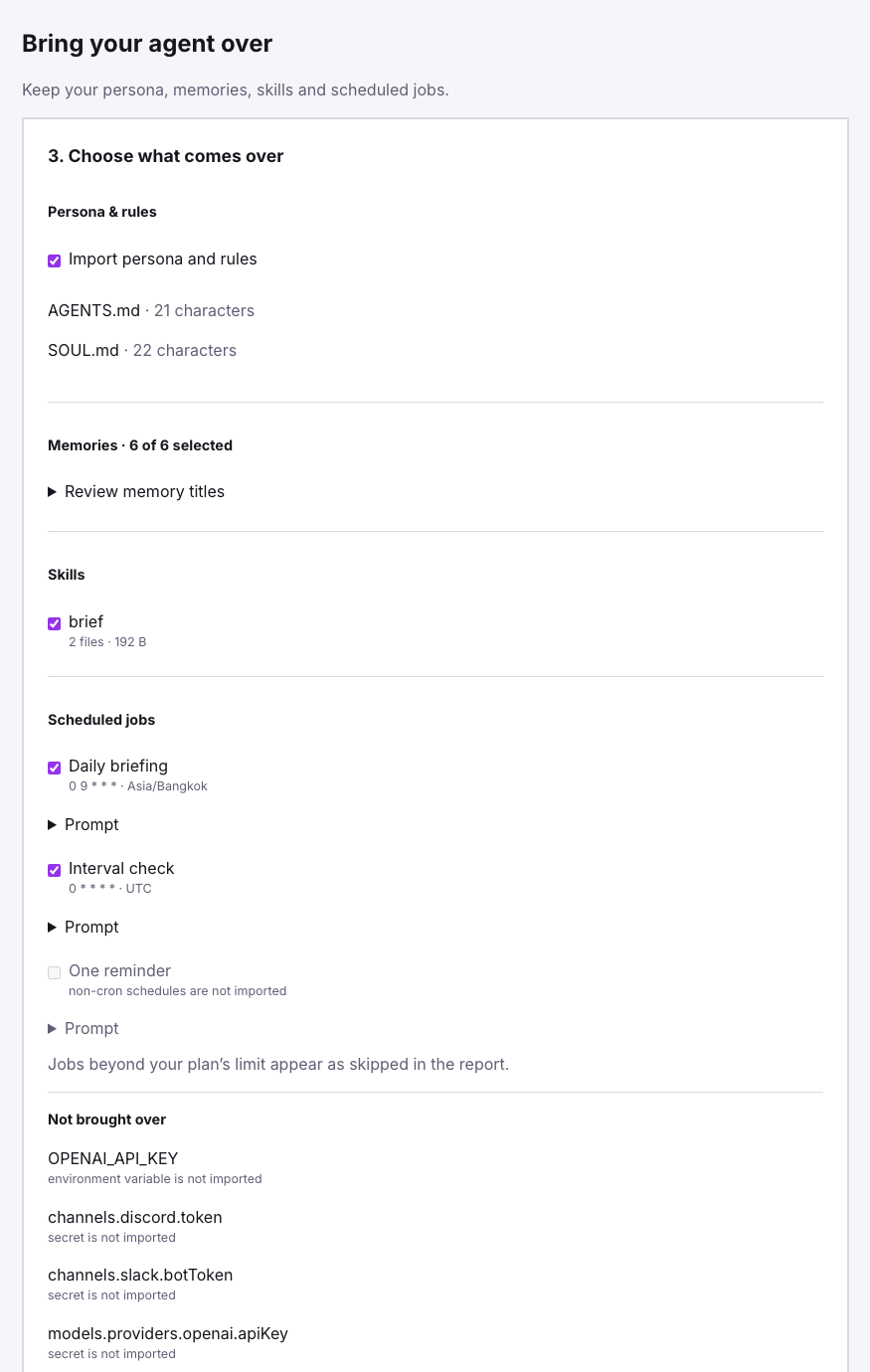
The screenshot is the Octomind Cloud import preview for an OpenClaw-format export, captured for our 15 October post: AGENTS.md and SOUL.md become the octo's instructions, six memories and a skill come over, two cron jobs keep their timezones, a one-off reminder is skipped because only cron schedules import, and the API keys and the Discord and Slack tokens are listed under "Not brought over". The command below is the self-hosted side: one octomind 0.58.8 daemon on a macOS laptop took a stdin prompt, two octomind send messages and one webhook POST, ran df through its shell tool and armed a 30-minute schedule. Its last cost frame reads $0.016 on deepseek:deepseek-flash.
jq -cR 'fromjson? | select(.type=="cost") | {session_cost, input_tokens, output_tokens, cache_read_tokens}' ops.jsonl | tail -1 {"session_cost":0.016463988,"input_tokens":29375,"output_tokens":2445,"cache_read_tokens":309248}
How to switch from OpenClaw
Install the binary, or sign up for Cloud
The installer puts octomind in ~/.local/bin on Linux, macOS or WSL; Homebrew, cargo and a Docker image work too. If you would rather not run a server at all, start on Octomind Cloud instead and skip to the Import step below.
curl -fsSL https://octomind.run/install.sh | bash octomind --helpBring your OpenClaw setup over
For Cloud, run the two export lines and upload the archive in the panel under Import: memories, skills, cron jobs and the Telegram bot come over after a preview, and API keys never do. To self-host, copy your skills into the global skills folder (same SKILL.md format; skills that call OpenClaw-only tools need edits) and put the durable facts from MEMORY.md and USER.md into an AGENTS.md in the folder the agent works from.
# Octomind Cloud: export, then upload openclaw-export.tgz under Import openclaw automations list --all --json > ~/.openclaw/cron-export.json tar czf openclaw-export.tgz -C ~ --exclude='*/sessions/*' --exclude='*/logs/*' --exclude='*.sqlite*' .openclaw # Self-hosted: skills and durable memory mkdir -p ~/.config/agents/skills ~/ops cp -R ~/.openclaw/workspace/skills/. ~/.config/agents/skills/ cat ~/.openclaw/workspace/MEMORY.md >> ~/ops/AGENTS.mdWrite one rule, then run the first job
The guard blocks rm -rf before the shell tool runs it. The -c flag sets a $0.50 hard stop per turn. The daemon keeps the ops session open, and octomind send drops the next message into it from any shell on the box. The first run clones the default tap and installs the shell and file tools, so it needs the network.
cd ~/ops && mkdir -p .agents
cat > .agents/guardrails.toml <<'EOF'
[[guard]]
match   = "shell(command=^rm\\s+-rf?)"
message = "rm -rf blocked."
EOF

echo "You are my ops agent on this box. Reply: ready." | \
  octomind -c max_request_spending_threshold=0.50 run developer:general \
  --name ops --daemon --format jsonl > ops.jsonl 2> ops.log &

octomind send --name ops "How full is the root disk? One line."
Other options worth a look
Hermes Agent
The closest like-for-like swap: MIT, Telegram, Discord, Slack, WhatsApp, Signal and email, and hermes claw migrate imports your OpenClaw persona, memory and skills.
NanoClaw
For isolation by default: each agent runs in its own Linux container, but it needs Docker, and Claude Code for adding channels.
NemoClaw
If you want to keep OpenClaw and fence it: NVIDIA's Apache-2.0 stack runs it inside an OpenShell sandbox. It is an alpha project.
Where OpenClaw is better
Far fewer chat channels
Self-hosted octomind has no Telegram, WhatsApp or Slack connector; you point your own bot at its webhook listener. Cloud covers Telegram, WhatsApp, Slack, Discord (direct messages only), email and GitHub. There is no iMessage, Signal, Matrix or SMS anywhere. Read more →
No ClawHub, and a much smaller community
Skills come from taps (GitHub repos) and SKILL.md folders you place yourself. OpenClaw has a public skills registry and 392.7k GitHub stars behind it. Read more →
The sandbox restricts writes only
--sandbox is off by default, limits writes to the working directory on Linux and macOS, and does not limit network or reads on Linux; on Windows it does nothing. An OpenClaw sandbox with the Docker backend puts tool execution in a container, which is a stronger wall. Read more →
Self-hosted schedules live and die with the process
The schedule tool fires only while octomind runs, and --daemon does not detach or install a service. OpenClaw keeps cron jobs in its Gateway database. Use the systemd unit on the self-hosted page, or a systemd timer that calls octomind send. Read more →
Octomind Cloud has no free tier
The free plan is the model hub alone: no octos, no routines, no chat connections. Octos start on Pro, $20 for the first month, then $50 a month with $50 of usage included. Read more →
Questions
What are the best OpenClaw alternatives?
It depends on why you are leaving. For container isolation by default, NanoClaw. For the closest swap with an importer, Hermes Agent. To keep OpenClaw and fence its network, NemoClaw. For rules in a TOML file, a hard spend stop and one binary for terminal, CI and daemon, octomind; to stop running a server, Octomind Cloud.
Is OpenClaw safe to keep using?
For one trusted person on one machine, with care. Its SECURITY.md treats anyone past Gateway auth as a trusted operator, loads plugins in-process as trusted code and puts prompt injection without a boundary bypass out of scope, and its sandbox is off by default. Turn the sandbox on and read every skill before you install it, whatever you decide.
Can I move my OpenClaw memory, skills and cron jobs?
Yes. On Octomind Cloud, upload an export under Import: memories, skills, cron jobs with their timezones and the Telegram bot come over after a preview, and API keys are never imported. Self-hosted, copy your skills folders into ~/.config/agents/skills/ and the durable facts from MEMORY.md into AGENTS.md. Schedules have to be set up again.
Does octomind work in Telegram like OpenClaw does?
On Octomind Cloud, yes: one-click official bot or your own @BotFather token, plus WhatsApp, Slack, Discord and email. The open-source binary has no chat connector; it takes work from octomind send, a webhook script, a timer or a WebSocket client, so Telegram needs your own bot pointed at the webhook.
Is octomind cheaper than OpenClaw?
The software costs the same: nothing. Both bill you through your model provider, so the model you pick sets the bill. What differs is control: octomind can stop a turn at a dollar limit you set. Octomind Cloud adds a subscription, from $50 a month with $50 of usage included.
Does self-hosted octomind send data anywhere?
Prompts go to the model provider you configure, which stays on your box with local: models. Telemetry is on by default and posts usage identifiers, including your role name, at exit; set telemetry = false or OCTOMIND_TELEMETRY=0. Note that ollama: means Ollama Cloud; local Ollama is local:.
More comparisons
- Claude Code alternative The same terminal agent loop on any model, open ones included, under Apache-2.0.
- opencode alternative Same open model as opencode: 24 of 25 tasks solved to its 19, at about half the cost.
- Hermes Agent alternative Lessons only from your corrections, as plain files you can edit, on your box or on Cloud
- Claude Cowork alternative Hand off the job once or daily, on any model; the result lands in Telegram, Slack or email
- Manus alternative Sourced reports and live pages from a cloud machine, on one balance that stops
- Codex alternative Keep your ChatGPT plan, add any other model, and stop a request at a dollar limit.
- Cursor alternative The agent without the editor: any model, your own keys, open source, next to any IDE.
- GitHub Copilot alternative The open-source agent for terminal and CI, on any model, billed by your own provider.
- Antigravity alternative An open-source terminal agent for Gemini, Claude or local models, no Google sign-in.
- DeepSeek Harness alternative DeepSeek models in a terminal and CI agent with tagged releases and a spend stop.
Reading
Try it on the job OpenClaw does for you now.
Apache-2.0 and any model. Install it, then follow the three steps above.
curl -fsSL https://octomind.run/install.sh | bash Or have Octomind Cloud run it: $20 your first month, cancel anytime. Nothing to install.